
Automation on Upwork can save time, but misuse can lead to warnings, account restrictions, or permanent bans. In 2025, 23% more accounts were banned due to automation violations, with suspended freelancers losing an average of $47,000 annually. The key to staying compliant is simple: automation is allowed for support tasks, but a human must always review and submit proposals manually.
What’s Not Allowed:
- Auto-submitting proposals.
- Scraping job feeds or profiles.
- Mass messaging or sending automated replies.
- Using tools to bypass CAPTCHAs or rate limits.
- Sharing login credentials with third-party tools.
What’s Allowed:
- Setting up job alerts via email or Slack.
- Using AI proposal tools vs. Upwork policies to draft proposals (with manual review).
- Tracking performance with external CRMs or dashboards.
Violating these rules can result in account suspension, reputation loss, and months of rebuilding. Tools like Convertix.io offer compliant solutions for agencies, automating tasks like job matching and proposal drafting while ensuring manual submission, starting at $299/month.
Staying within Upwork’s guidelines protects your income, reputation, and long-term success.
Upwork’s New Rules Could Cost You Your Account
sbb-itb-5c5517e
Upwork’s Automation Policies Explained
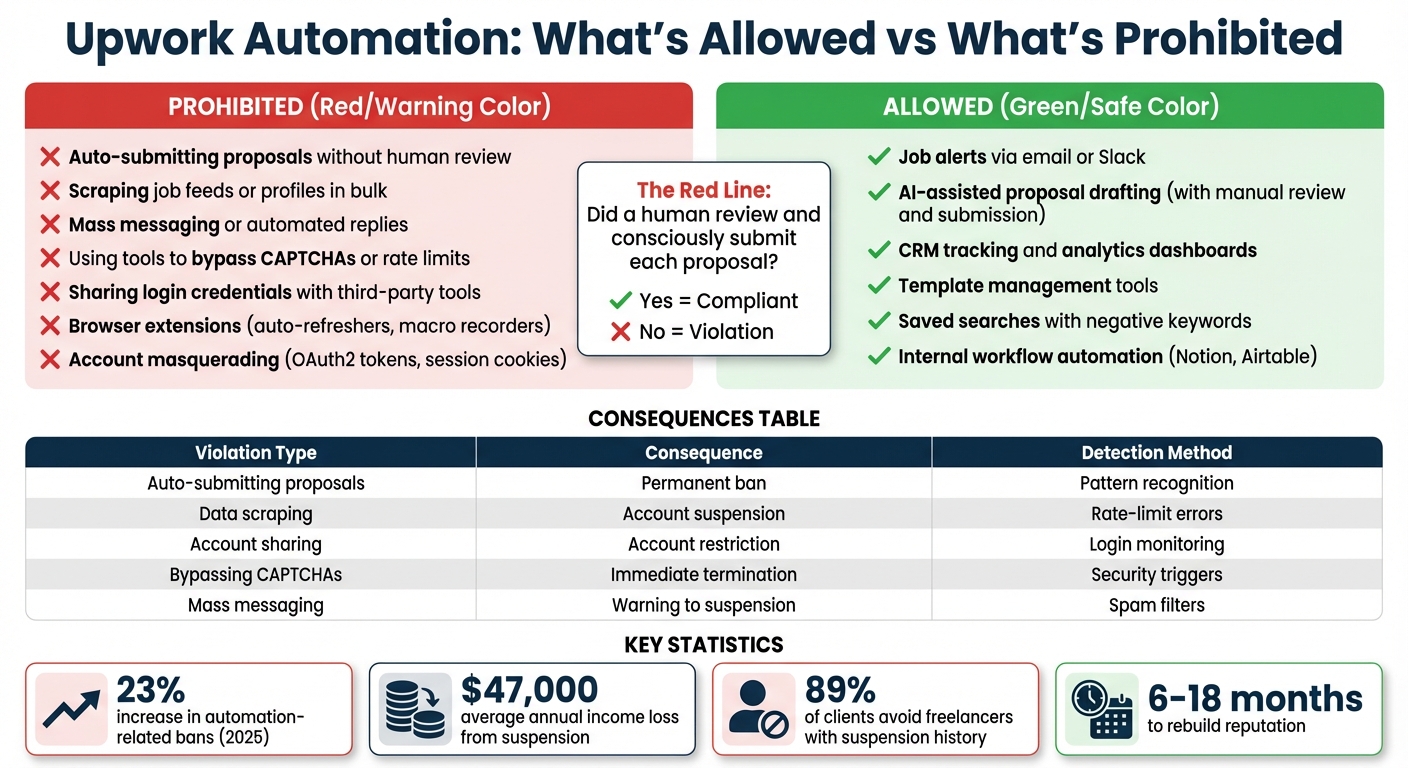
Upwork Automation Rules: Allowed vs Prohibited Practices
Main Automation Rules
Upwork defines automation as using tools to complete tasks more quickly or on a larger scale than a person could manage manually. While automation isn’t entirely off-limits, the platform enforces strict guidelines to ensure fairness and compliance.
Activities that are not allowed include:
- Auto-submitting proposals without human involvement.
- Scraping data from profiles or job feeds in bulk.
- Sending mass messages or auto-responses without oversight.
- Using third-party tools to log in and act on your behalf (account masquerading).
- Deploying bots to bypass security features like CAPTCHAs, rate limits, or identity checks.
Additionally, Upwork restricts its public API to basic functions, such as retrieving profiles or sending messages. Using unofficial APIs or reverse-engineered methods is considered a breach of their rules.
"The red line is: did a human review and consciously submit each proposal? If yes, you’re compliant. If the tool submits automatically, you’re not." – OpenProposal
On the other hand, acceptable practices include:
- Setting up job alerts via email or Slack.
- Using AI vs manual proposal writing techniques to draft proposals, as long as a person reviews and submits them.
- Employing CRMs or dashboards to track performance outside the platform.
Knowing these boundaries is essential, as breaking the rules can bring serious repercussions.
What Happens When You Break the Rules
Violating Upwork’s automation policies can lead to escalating penalties. The platform follows a tiered approach to enforcement. Initial violations often result in warnings or feature restrictions. Repeated or serious offenses, such as employing unauthorized auto-apply APIs or browser bots, may lead to temporary suspensions or even permanent bans without the possibility of appeal.
Upwork uses several methods to detect violations, including:
- CAPTCHA triggers.
- Errors caused by exceeding rate limits.
- Identifying non-human browsing behaviors.
- Spotting rapid and identical proposal submissions.
| Violation Type | Potential Consequence | Detection Method |
|---|---|---|
| Auto-submitting proposals | Permanent ban | Pattern recognition and high volume |
| Data scraping | Account suspension | Rate-limit errors and security triggers |
| Account sharing/masquerading | Account restriction | Monitoring of login credentials |
| Bypassing CAPTCHAs | Immediate termination | Detection of security workarounds |
| Mass messaging/spam | Warning to suspension | Client reporting and spam filters |
Importantly, Upwork places the responsibility for violations squarely on the account holder, not the developers of third-party tools.
With these rules and consequences in mind, the next step is understanding how to use automation responsibly while staying within Upwork’s guidelines.
Automation Practices Upwork Prohibits
Banned Automation Activities
Upwork has strict rules when it comes to automation, and certain activities are completely off-limits. For instance, bulk proposal submission – using tools to automatically send bids without human involvement – is not allowed (instead, use a personalized proposal generator to maintain quality). This includes using browser extensions that auto-refresh job feeds and immediately send generic proposals whenever a match appears.
Another banned activity is the use of data scraping tools to collect job feeds, profiles, or client information in bulk. Similarly, mass messaging – automated invites or responses sent without manual input – violates Upwork’s Terms of Service.
Upwork also prohibits certain browser extensions. These include tools like auto-refreshers, page monitors, macro recorders, auto-paging helpers, and custom user scripts. Such tools mimic non-human behavior, which Upwork’s systems are designed to detect and flag.
Using security circumvention tools – such as those that bypass CAPTCHAs, evade rate limits, or skip verification steps – is another major violation. Alongside this, account masquerading is strictly forbidden. This includes sharing your login credentials with others or using tools that log in and act on your behalf. Examples of this include employing OAuth2 tokens or session cookies in scripts, or directly accessing website pages instead of using approved API endpoints.
It’s important to understand these restrictions, not just to comply with the rules but also to avoid the risks associated with these practices.
Why These Practices Are Risky
Engaging in prohibited automation can have severe consequences. In 2025 alone, Upwork reported a 23% increase in account bans related to automation due to tighter enforcement measures. If your account is suspended, you could lose an average annual income of $47,000. This isn’t just about future opportunities – it also means losing active contracts and the reputation you’ve spent years building.
The damage doesn’t stop there. Research indicates that 89% of clients avoid freelancers with a history of account suspensions. On top of that, your Job Success Score, client reviews, and entire work history vanish, forcing you to start over. Rebuilding your reputation on a new platform can take anywhere from 6 to 18 months.
Beyond financial and reputational harm, these practices can expose you to security threats. Sharing login credentials with automation tools increases the risk of account theft, phishing attacks, and fraud. Additionally, these activities harm the platform as a whole. Automated, low-quality submissions overwhelm clients, making job feeds chaotic and reducing trust in the marketplace.
Automation Practices Upwork Allows
Approved Automation Methods
Upwork doesn’t prohibit all automation – it just insists that a human stays in charge. This means you can use specific tools to save time while keeping your account safe.
For example, job alerts and discovery tools are completely fine, as long as they don’t auto-submit proposals. These tools monitor job feeds and notify you via Slack, email, or your dashboard when a relevant opportunity pops up. This way, you can act quickly without constantly refreshing job boards.
AI-assisted proposal drafting is also allowed. You can use AI to create a draft for your cover letter, but it’s crucial that a human reviews, edits, and manually submits each proposal.
You can also automate your internal workflows. Tools like Notion or Airtable are great for organizing your pipeline – from tracking proposals to managing interviews and wins. You can also use analytics dashboards to monitor key metrics like reply rates and revenue per proposal. Additionally, template management tools that store pre-written text snippets for manual customization are perfectly acceptable.
If you’re wondering about the cost, building a compliant automation setup typically runs between $40 and $50 per month. These methods not only keep your account secure but also make your daily tasks more efficient.
Why Following the Rules Helps Your Agency
Sticking to Upwork’s rules isn’t just about avoiding penalties – it’s also about improving your performance. Freelancers who use compliant tools like job alerts and AI-generated proposals, paired with workflow automation, can save 15 to 20 hours per week on manual job searching.
The advantages don’t stop at time savings. Using compliant automation can help you send 200–300% more applications and increase your job success rates by 150–200%. Plus, following the guidelines protects your long-term income. A suspended account can cost freelancers an average of $47,000 annually and take anywhere from 6 to 18 months to rebuild their reputation. Staying within the rules ensures you avoid these setbacks while maintaining steady growth.
Convertix.io: Policy-Compliant Automation for Upwork Agencies
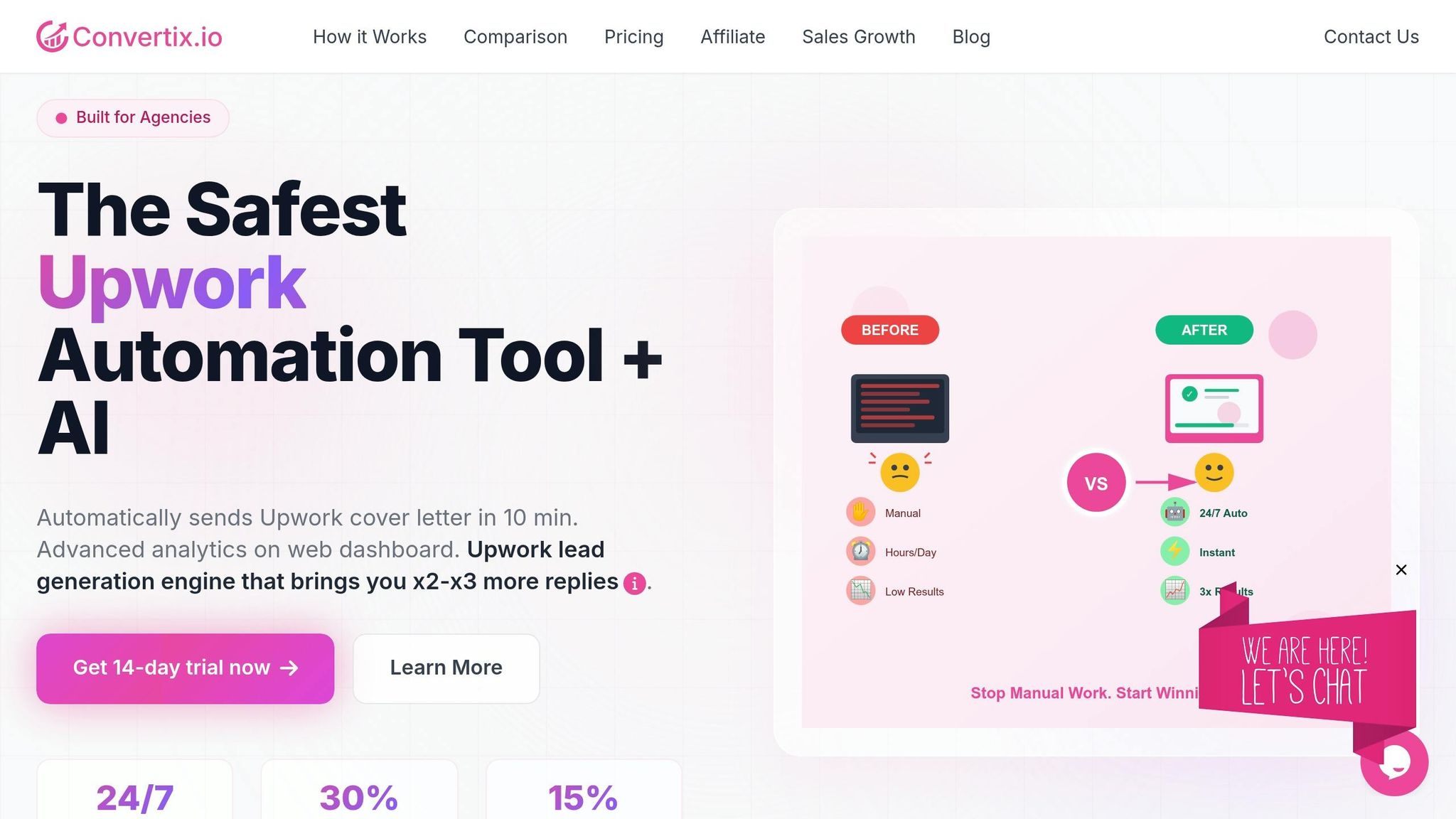
What Convertix.io Does
Convertix.io provides a specialized solution for Upwork agencies aiming to streamline their lead generation efforts while staying within Upwork’s guidelines. The platform automates key tasks like job matching, proposal creation, and performance tracking, eliminating the need for manual vs. automated lead generation tasks like monitoring and repetitive proposal writing.
What makes Convertix.io stand out is its portfolio-driven approach. Instead of relying on generic templates, the AI reviews your agency’s portfolio to match it with the most relevant projects. It even pulls in details like project titles, URLs, and tech stacks to craft personalized proposals. These proposals are typically sent within 10 minutes of a job posting, giving you a chance to connect with clients during the critical early period.
The platform also includes a web dashboard for tracking metrics like proposal view rates and reply rates. This helps you identify which proposal templates are working best. Additionally, it integrates with a Notion-based mini-CRM, making it easier to manage your pipeline from initial proposal to final contract.
How Convertix.io Follows Upwork’s Rules
Convertix.io ensures compliance with Upwork’s policies by incorporating human oversight at key decision points. Notifications are sent via Slack or Telegram when manual input is needed. The platform uses verified accounts, real browsers, and dual-layer AI filtering to simulate human actions and avoid spam-like behavior.
Convertix.io Pricing Options
Convertix.io offers three subscription plans to cater to agencies of varying sizes:
| Plan Name | Price | Description | Features | Limitations |
|---|---|---|---|---|
| Starter | $299/month | Ideal for small agencies | 300 proposals/month, advanced portfolio matching, priority support | Capped at 300 proposals/month |
| Advanced | $599/month | Suited for growing agencies | 600 proposals/month, custom portfolio optimization, 24/7 support | Capped at 600 proposals/month |
| Bespoke | Contact Us | Tailored for large agencies | Unlimited proposals, custom features, dedicated account manager | No specified limits |
Agencies using Convertix.io typically report proposal view rates of 25–30% and reply rates between 5% and 15%.
"Convertix reduced our proposal workflow from 15 hours to about 3–5 hours per week and made scaling our Upwork outreach much easier." – Zoha, Co-Founder of Skip The Noise Media
With its compliance-focused automation and flexible pricing, Convertix.io makes it easier for agencies to scale their outreach efforts while staying aligned with Upwork’s rules.
How to Use Automation Responsibly on Upwork
Methods for Compliant Automation
The golden rule is straightforward: a human must always submit proposals manually. While automation can help draft proposals, the final submission must involve a person. This "human-in-the-loop" approach ensures compliance while still saving you valuable time each week.
To stay on the safe side, focus your automation efforts off the Upwork platform. Use tools like internal CRMs, dashboards, or template libraries to streamline your proposal process without directly interacting with Upwork’s interface.
Make it a habit to review Upwork’s Terms of Service every three months. This ensures that any tools or processes you’re using remain compliant with the platform’s latest policies.
You can also optimize your job search by using saved searches and applying negative keywords. This approach cuts through irrelevant listings and helps you focus on projects that align with your ideal client profile, making it easier to craft tailored proposals.
Before diving deeper, let’s look at common mistakes freelancers make with automation.
Common Automation Mistakes to Avoid
Using automation responsibly not only improves efficiency but also safeguards your account and reputation.
Avoid sending identical proposals. This is one of the quickest ways to raise red flags. Each proposal should be customized with details specific to the client’s project.
Never use tools that require your login credentials. If third-party software logs in "as you", Upwork holds you accountable for any violations – not the software vendor. This includes browser automation tools like Selenium or Puppeteer, which Upwork’s detection systems can easily identify and flag, often leading to permanent account suspension.
Don’t move conversations off-platform before securing a contract. Suggesting communication via WhatsApp, email, or phone in your initial proposals is a common mistake that can result in account suspension. Stick to Upwork’s messaging system until a contract is in place.
Steer clear of including external links in your proposals. Links to personal websites, other freelance platforms, or portfolio sites hosted outside of Upwork are prohibited under Section 3.5 of Upwork’s Terms of Service. Shockingly, about 91% of freelancers still make this mistake.
Finally, keep an eye on your proposal volume. If you’re submitting more bids than a person could realistically write, or if you frequently encounter "Are you human?" captcha checks, it’s a clear sign that your automation is overstepping its bounds.
Conclusion
Using automation on Upwork isn’t about picking between efficiency and compliance – it’s about striking the right balance. As Vadym Ovcharenko wisely states, "automation can prepare and support, but humans must decide and send." This approach not only saves 5–10 hours per week but also ensures your account remains secure and within Upwork’s guidelines.
The key is focusing on "green zone" automation. Using the best Upwork tools for small agencies can help you scale safely. Tools like job alerts, AI-assisted drafts (with manual review), CRM tracking, and analytics can help you work smarter without crossing Upwork’s boundaries. On the flip side, steer clear of risky practices like auto-submitting proposals, mass messaging, data scraping, or using tools that require sharing your login credentials. Compliance isn’t just a suggestion – it’s essential.
For agencies looking to maintain this balance, Convertix.io provides a powerful, rule-abiding solution. Their platform uses proprietary safety technology that avoids Upwork API calls and operates through verified human accounts, real browsers, and dedicated PCs. This ensures compliance while cutting down on manual labor and boosting outreach efficiency. The system applies to jobs within 10 minutes of posting and operates around the clock.
With cost-effective plans starting at $299 per month and a 14-day free trial, Convertix.io offers a compliant alternative to expensive in-house lead generation. Plus, their portfolio-focused personalization ensures every proposal highlights why your experience is a perfect fit for the client, maintaining quality even as you scale up.
FAQs
How can I tell if an automation tool is safe to use on Upwork?
To figure out if an automation tool is safe to use on Upwork, start by checking if it adheres to Upwork’s Terms of Service. Steer clear of tools that engage in activities like auto-bidding, scraping data, or impersonating users – these actions are often flagged as violations. Focus on tools that explicitly state they are compliant with Upwork’s rules. Be cautious of anything that operates at speeds or scales beyond what a human could reasonably achieve. Always double-check that the tool avoids any prohibited activities and aligns with Upwork’s guidelines.
What’s the safest workflow for using AI to write proposals without getting flagged?
The best approach to using AI for writing proposals on Upwork is to treat it as a helpful tool rather than a full automation solution. AI can assist by analyzing job postings, drafting tailored proposals, and organizing your workflow through steps like intake, context extraction, drafting, and safety checks. However, it’s crucial to manually review and personalize every proposal before sending it. Relying on fully automated submissions or bots is against Upwork’s policies and could result in account restrictions.
What warning signs suggest Upwork thinks my activity is automated?
Upwork monitors user activity to ensure it aligns with natural, human-like behavior. If actions appear automated – such as submitting proposals at an unusually fast pace or excessively refreshing feeds – it could trigger a flag for suspicious activity. These behaviors might lead to warnings or even account restrictions. To stay on the safe side, follow Upwork’s guidelines and make sure your usage reflects typical human activity.
