
Writing Upwork proposals can be time-consuming, especially when competing for attention in a crowded marketplace. AI tools can help you draft winning Upwork proposals faster. This article highlights four tools that can simplify your workflow:
- Jasper: Focuses on maintaining a professional tone with features like Brand Voice and Knowledge Base to personalize proposals. Pricing starts at $59/month (billed annually).
- ChatGPT: Ideal for quick drafting using strategic prompts or an Upwork proposal generator. The free version works well, while ChatGPT Plus costs $20/month for advanced features.
- Grammarly: Enhances and polishes proposals with real-time grammar and tone adjustments. Pro plan starts at $12/month (billed annually).
- Convertix.io: Automates the entire proposal process for agencies, from job matching to submission. Plans start at $299/month.
Each tool addresses specific aspects of proposal writing, from drafting to editing and automation. For solo freelancers, combining ChatGPT and Grammarly can be a cost-effective solution. Agencies may benefit from Convertix.io for streamlined workflows.
Never Write A Job Proposal Again (Use AI & Automation)
sbb-itb-5c5517e
1. Jasper
Jasper is a generative AI writing assistant tailored for freelancers who want to maintain a professional tone in their proposals. Unlike AI automation tools on Upwork that handle bidding, Jasper focuses on crafting top-notch content while leaving the submission process in your hands – an essential feature for time-sensitive jobs.
Proposal Customization
One standout feature is its Brand Voice, which analyzes your past successful proposals to mimic your unique style. This ensures your proposals feel authentic and not like cookie-cutter templates. On the Pro plan, you can create up to two Brand Voices, while the Business plan allows for unlimited voices. This flexibility is especially handy if you work across different industries or client types.
Jasper also includes a Knowledge Base, where you can upload resumes, portfolios, and case studies. The AI draws from this library to seamlessly incorporate your past successes into new proposals. For instance, if you’re bidding on a web development project, Jasper might highlight a similar e-commerce site you built, complete with measurable outcomes.
Zoran Trimmel, Content Manager at TechDictionary.io, shared: "Jasper is my go-to… its Brand Voice feature is a game-changer. I’ve ‘trained’ it on my website’s content, and it consistently produces copy that sounds like it came from me".
Automation Level
Jasper simplifies drafting by creating elements like executive summaries, project scopes, and service descriptions using its collaborative "Canvas" feature. However, you still handle the final review and submission, ensuring a personal touch. It doesn’t scan job boards, auto-submit bids, or manage client communications – keeping you in full control of the process.
Victor Ijidola, Co-founder of Leaps, remarked: "The businesses getting incredible value from Jasper are the ones who already know what great content looks like. They’re using it as an assistant to execute a strategy faster".
The Jasper Everywhere browser extension for Chrome and Edge allows you to work directly within Upwork’s platform, eliminating the need to switch between apps. This streamlines editing and keeps your workflow organized. According to case studies, Jasper can cut content creation time by 50%, and Mongoose Media reported a 166% boost in organic traffic within two months of using the tool.
These features make Jasper adaptable to both solo freelancers and larger teams, with pricing options to match.
Pricing (USD)
| Plan | Monthly Price | Annual Price | Brand Voices | Knowledge Assets | API Access |
|---|---|---|---|---|---|
| Pro | $69/month | $59/month | 2 | 5 | No |
| Business | Custom | Custom | Unlimited | Unlimited | Yes |
The Pro plan is ideal for individual freelancers or small teams, while the Business plan caters to agencies juggling multiple clients. For those managing larger operations, exploring the best Upwork automation tools for agencies can provide additional scaling options. Jasper also offers a 7-day free trial of the Pro plan, giving you a chance to test the Brand Voice feature with real proposals. Non-profits can benefit from a 20% discount on all plans.
Upwork Integration
Although Jasper doesn’t have direct integration with Upwork for auto-pulling job details or submitting proposals, its Chrome/Edge extension bridges the gap. You can write and edit directly in Upwork’s editor, which saves time and keeps everything in one place. You’ll still need to manually input job details into Jasper or use the extension to generate content on demand. This manual approach ensures your proposals remain tailored and personal – key factors in standing out to potential clients.
2. ChatGPT
ChatGPT serves as a helpful drafting assistant, enabling you to craft personalized Upwork proposals without fully automating the process. By manually copying job descriptions into ChatGPT and refining the output, you can significantly cut down the time spent on proposals. While creating proposals manually can take 20–30 minutes, using strategic prompts with ChatGPT reduces the process to just 2–3 minutes.
Proposal Customization
Effective proposal customization relies on a two-step prompting approach. First, create a Master Profile Prompt that outlines your professional identity, key skills, and 3–4 recent project examples with measurable results. Next, use a job-specific prompt that analyzes the client’s job description, allowing you to align your experience with their needs. ChatGPT can even adjust its tone to match the client’s preferred style, whether it’s formal, casual, or technical.
Marcus Chen, a freelancer, shared: "By crafting strategic ChatGPT prompts, I transformed my response rate from 2% to an impressive 35% in just two weeks".
In May 2025, Chen sent 100 manual proposals, achieving a mere 2% success rate. When he started using tailored ChatGPT prompts to align proposals with job descriptions and client tones, his response rate soared to 35% in just two weeks. This highlights how personalized, AI-assisted drafting can dramatically improve results.
Automation Level
ChatGPT takes care of about 80% of the proposal drafting process, leaving you to add the final touches. Personalizing the proposal with unique stories, insights, and a thorough proofreading step ensures the output feels authentic and avoids coming across as robotic.
Mohammad Owais, who developed an AI workflow, noted: "The goal wasn’t to remove myself from the process – it was to remove blank-page stress and keep quality consistent".
In November 2025, freelancer Imran Ali tested ChatGPT on 10 Upwork jobs. While the AI generated proposals quickly, the tone felt robotic, prompting him to add personal experiences manually. This adjustment led to a 30% response rate, with 3 client replies out of 10 proposals. With AI assistance, freelancers can submit over 50 personalized proposals daily, compared to just 5–8 when writing manually.
Pricing (USD)
ChatGPT offers a free tier with access to basic models like GPT-4o mini. For advanced features, ChatGPT Plus is priced at $20/month, providing access to GPT-4, higher usage limits, and custom GPT options. Some platforms, like i10X, offer access to ChatGPT starting at $8. Compared to enterprise tools, ChatGPT is more budget-friendly – Jasper costs $39/month (billed annually), and Grammarly Premium starts at $12/month.
Upwork Integration
Although ChatGPT automates much of the drafting process, it doesn’t integrate directly with Upwork. You’ll need to manually copy job descriptions into ChatGPT and paste the generated proposals back into Upwork’s editor. Some freelancers use third-party browser extensions or automation platforms connected to the OpenAI API to streamline this, but these require additional setup. Unlike specialized tools with Chrome extensions, ChatGPT relies on a copy-paste workflow. While this adds a few extra steps, it allows for greater personalization.
3. Grammarly
Grammarly works as a real-time editing assistant, focusing on polishing your proposals rather than creating them from scratch. While tools like ChatGPT and Jasper handle drafting, Grammarly refines the text to ensure it’s polished, professional, and error-free – perfect for freelancers aiming for precision and consistency in their proposals.
Proposal Customization
The Set Goals feature allows you to customize Grammarly’s feedback by selecting an audience type (general, knowledgeable, or expert), defining your intent (inform, convince, or tell a story), and adjusting the level of formality. Its Tone Detector evaluates your proposal as you write, helping you match the tone of your client’s job post. For instance, if the client’s post leans casual, Grammarly offers suggestions to align your proposal’s tone while keeping it professional. Additionally, its AI rewriting tool can instantly rephrase clunky sentences, giving your proposals a sharper, more impactful edge.
Automation Level
Grammarly is built for refining drafts rather than creating long-form content. It can handle short-form content and automate sentence rewrites for better clarity and impact. The Pro plan includes up to 2,000 AI prompts per month, which can help expand ideas or brainstorm content directly within Upwork’s platform. Considering that roughly 45% of Upwork proposals are rejected due to poor formatting or grammar, Grammarly’s real-time corrections can significantly improve your chances. These editing tools streamline the process, ensuring your proposals are polished before you even think about pricing.
Pricing (USD)
Grammarly’s Free Plan covers basic grammar checks and includes 100 AI prompts per month. For more advanced features, the Pro plan is available at $12/month (billed annually), $20/month (billed quarterly), or $30/month on a monthly basis. The Pro plan unlocks features like 2,000 AI prompts, advanced tone analysis, full-sentence rewrites, and plagiarism detection. Businesses using Grammarly report saving about 20 days annually and achieving an average ROI of 17x through improved writing efficiency.
Upwork Integration
Grammarly integrates seamlessly into your workflow as a browser extension. It works directly on Upwork’s proposal submission page, offering real-time feedback as you type. Officially integrated with Upwork as of March 20, 2023, Grammarly operates quietly in the background, catching errors and suggesting improvements without disrupting your flow. This feature is especially helpful for freelancers juggling multiple client styles, ensuring your proposals stay polished and professional – an essential edge for standing out on Upwork.
4. Convertix.io
Freelancers might rely on AI tools for drafting and editing, but agencies need something more robust – tools that can handle the entire proposal process. That’s where Convertix.io steps in, offering full automation for Upwork agencies, from finding jobs to submitting proposals, all while working 24/7.
Proposal Customization
Convertix.io uses AI to tailor proposals with a focus on your portfolio. It automatically picks the most relevant projects to highlight your expertise for each job. By employing a job validation prompt, it ensures the criteria and tone are spot-on, filtering leads and crafting proposals that align perfectly with client expectations.
Automation Level
This platform is a true time-saver. It bids on jobs within 10 minutes of their posting, requiring little to no manual input. For example, in 2024, an India-based software development agency reported impressive results – 42% of their proposals were viewed, and 28% received replies within 48 hours. They also slashed their weekly proposal time from 15 hours to just 3–5 hours.
Zoha, Co-Founder of Skip The Noise Media, shared: "Convertix reduced our proposal workflow from 15 hours to about 3–5 hours per week and made scaling our Upwork outreach much easier".
Pricing (USD)
Convertix.io offers three pricing tiers:
- Starter Plan: $299/month for 300 proposals, advanced portfolio matching, and priority support.
- Advanced Plan: $599/month for 600 proposals, custom portfolio optimization, and 24/7 support.
- Bespoke Plan: Custom pricing for unlimited proposals and tailored features.
Each plan includes a 14-day free trial, letting you test the waters before committing.
Upwork Integration
The platform connects seamlessly with Upwork’s Agency Business Manager through verified accounts, ensuring it stays within Upwork’s Terms of Service. Onboarding is quick – just 1 to 3 days – and the system helps you save about 30% of your connects by targeting only the most relevant jobs.
Pros and Cons Comparison
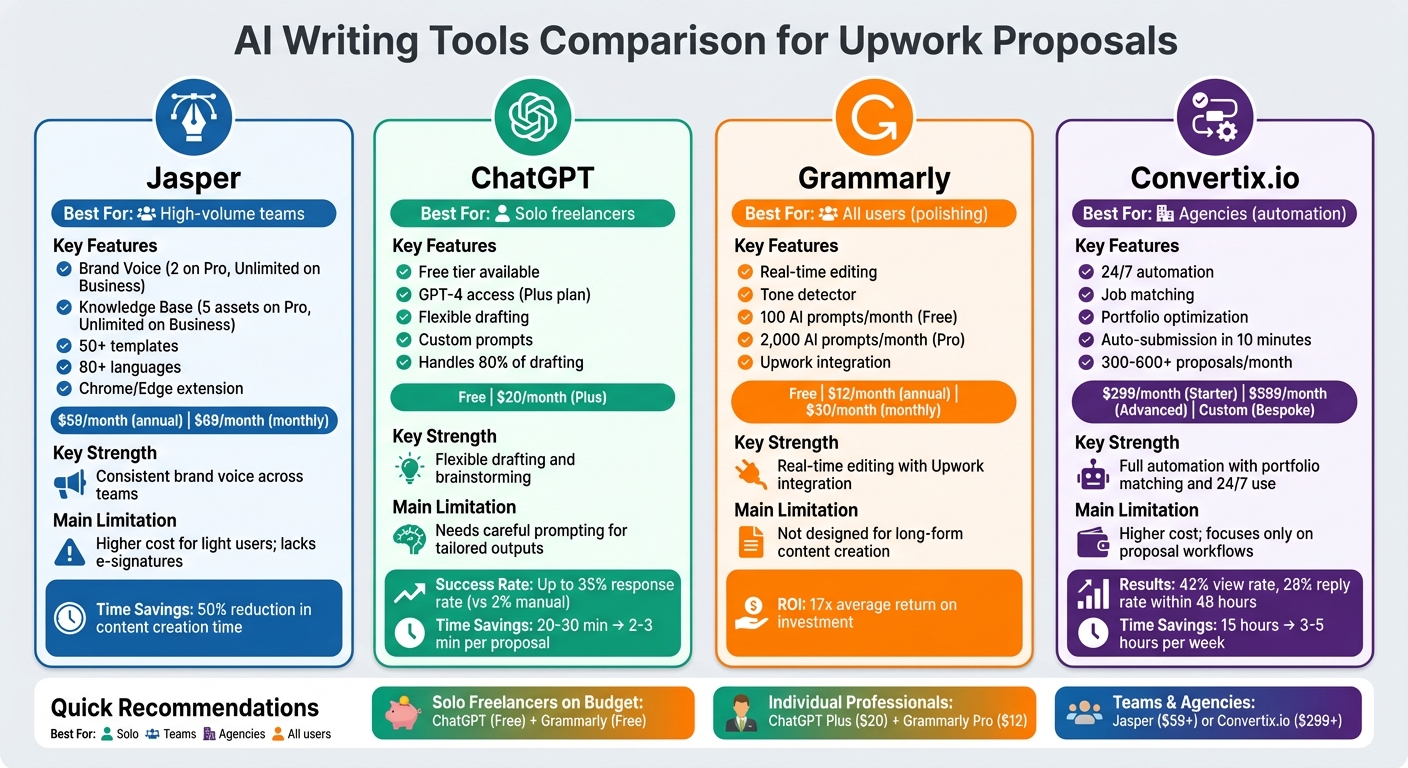
AI Writing Tools for Upwork Proposals: Features and Pricing Comparison
Here’s a breakdown of the tools, summarizing their key features, strengths, and areas to consider.
Jasper
Jasper stands out for maintaining a consistent brand voice across teams, offering over 50 templates and support for 80+ languages. This makes it ideal for teams managing high-volume content. However, it may feel like a steep investment for light users and lacks specific features like e-signatures needed for proposals.
ChatGPT
ChatGPT is a flexible tool for drafting and brainstorming, though it requires thoughtful prompts to fine-tune results. The free tier covers basic needs, while the Plus plan provides faster responses and extra features. On occasion, it may produce repetitive outputs.
Grammarly
Grammarly excels at refining and polishing proposals rather than generating them from scratch. The free version includes 100 AI prompts monthly, while the Pro plan increases this to 2,000. Its integration with Upwork ensures real-time editing and tone adjustments, helping proposals match client expectations.
Convertix.io
Convertix.io is tailored for those looking to scale your agency on Upwork, offering automation for job matching, proposal generation, and submission. Its portfolio-focused approach and 24/7 functionality optimize workflows for high-volume proposal submissions. However, it requires a higher financial commitment and is specialized for proposal-related tasks.
| Tool | Best For | Key Strength | Main Limitation |
|---|---|---|---|
| Jasper | High-volume teams | Consistent brand voice with 50+ templates | Higher cost for light users; lacks e-signatures |
| ChatGPT | Solo freelancers | Flexible drafting and brainstorming | Needs careful prompting for tailored outputs |
| Grammarly | All users (polishing) | Real-time editing with Upwork integration | Not designed for long-form content creation |
| Convertix.io | Agencies (automation) | Full automation with portfolio matching and 24/7 use | Higher cost; focuses only on proposal workflows |
Conclusion
Pick tools that fit your workflow and budget. For solo freelancers working with limited resources, combining ChatGPT’s free version for idea generation with Grammarly’s free plan for refining text can handle the basics – without any monthly fees. This setup helps you make the most of these tools while keeping costs low.
For agencies aiming for full automation, Convertix.io is a game-changer. It finds the right jobs for you before you even start drafting. From there, you can create a customized draft with ChatGPT, apply persuasive frameworks like AIDA using Jasper, and fine-tune with Grammarly’s tone detection features. This streamlined process can cut drafting time from 23 minutes to under 3 minutes. Plus, top freelancers using similar strategies often see response rates between 18–25%, well above the average of 12% on platforms like Upwork. By integrating these tools, you can save time, improve proposal quality, and boost client engagement.
FAQs
What info should I paste into AI to get a truly tailored Upwork proposal?
To write a personalized Upwork proposal using AI, start by providing details such as the job description, your profile information (including skills, experience, and past projects), and any key points you want to highlight. By including these elements, the AI can create a proposal that directly addresses the client’s needs.
Be sure to share specific job requirements and emphasize how your expertise aligns with them. This approach ensures the proposal feels tailored and relevant, increasing your chances of making a strong impression.
How do I keep AI-written proposals from sounding generic or “robotic”?
To make your proposals stand out and avoid sounding generic, focus on personalization. Start by tailoring the content to the specific job and the client’s needs. Use AI-generated text as a foundation, but take the time to manually edit and inject your own unique insights, highlight relevant experiences, and adopt a conversational tone. Pulling in details directly from the job description not only makes your proposal feel more genuine but also shows the client you’ve taken the time to understand their requirements. This approach builds trust and significantly increases your chances of landing the job.
Which tool combo is best for me: solo freelancer or agency?
Freelancers working solo can streamline their workflow with tools like Jasper and ChatGPT. These platforms make it easier to craft personalized, high-quality proposals quickly, saving time while improving the overall quality of their work.
For agencies managing multiple clients, scalable solutions like Convertix.io are ideal for automating large volumes of proposal creation without sacrificing quality. Pairing this with tools such as PouncerAI ensures efficient team-based proposal management, enabling agencies to juggle multiple projects while still tailoring proposals for important opportunities.
