
Automating your Upwork proposals can save time, improve response rates, and help you win more clients. Comparing manual vs. automated Upwork lead gen, writing proposals manually is slow and often ineffective, with average win rates of just 1–3%. Platforms like Convertix.io streamline this process by using AI to craft tailored proposals and submit them within 10 minutes of a job posting. Key benefits include:
- Time Savings: Reduce weekly proposal writing from 15 hours to 3–5 hours.
- Higher Engagement: Achieve proposal view rates of 25–30% and reply rates of 5–15%.
- Cost-Effective: At $299/month, it’s cheaper than hiring a lead generation manager.
- 24/7 Automation: Capture global opportunities without additional staffing.
Convertix.io analyzes your portfolio, filters jobs based on your expertise, and customizes proposals to match client needs. With a quick setup and real-time analytics, you can optimize your approach and focus on high-quality leads.
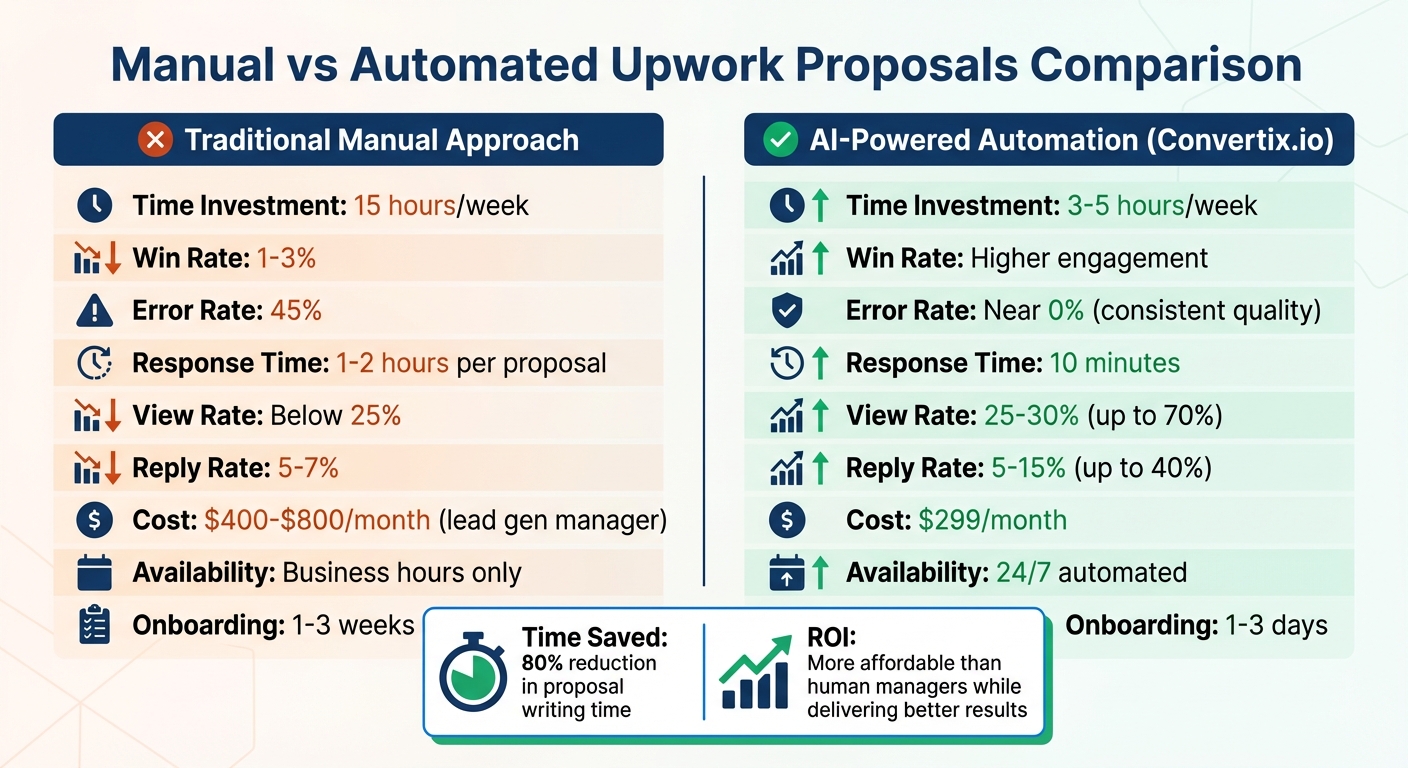
Manual vs Automated Upwork Proposals: Time, Cost & Performance Comparison
How We Automate Upwork Proposals with AI (n8n + ChatGPT + Google Docs)
sbb-itb-5c5517e
Why Agencies Should Automate Upwork Proposals
Speed is everything on Upwork. Manual proposal submissions often take 1–2 hours, while AI-driven systems can respond within just 10 minutes of a job posting. This matters because the average job on Upwork receives 47 proposals within the first 24 hours. Being among the first to submit doesn’t just improve your chances of being seen – it also boosts client engagement on this fast-moving platform.
The operational benefits are hard to ignore. Take Skip The Noise Media, for example. This Canadian agency, which has earned over $100,000 on Upwork, drastically reduced its workload by automating its proposal process. Co-founder Zoha shared:
"Convertix reduced our proposal workflow from 15 hours to about 3–5 hours per week and made scaling our Upwork outreach much easier".
Another success story comes from a Ukrainian QA agency with over $500,000 in Upwork earnings. During a 21-day period of automated bidding, they achieved a 70% proposal view rate and a 40% reply rate.
AI personalization enhances the quality of proposals. Manual submissions often include errors – like grammar mistakes, formatting issues, or even using the wrong client name – leading to a 45% error rate. In contrast, automated systems ensure every proposal meets key benchmarks, such as being 150–300 words long, using the correct client name, and referencing relevant portfolio items. This attention to detail helps top users achieve response rates of 18–25%, far above the platform’s 12% average.
Then there’s the financial upside. Automation is far more affordable than hiring a human lead generation manager. For $299 per month, automation eliminates the need for a manager who might cost $400 to $800 monthly, plus commissions. Automated systems also work 24/7, capturing opportunities across time zones without adding to staffing costs. And with onboarding completed in just 1–3 days, compared to the 1–3 weeks it takes to train a new hire, you can start seeing results faster.
Now that we’ve covered the benefits, let’s dive into how to configure Convertix.io for the best job matching and proposal generation.
How to Set Up Convertix.io for Job Matching and Proposal Generation
Setting up Convertix.io is all about ensuring precise job matching and creating tailored proposals that align with your agency’s strengths. By fine-tuning its filters, you can make sure the platform delivers high-quality, automated proposals designed to win over clients using an Upwork proposal generator.
Convertix.io uses a system with three filtering layers to help you bid only on jobs that match your expertise. Here’s how it works:
- Smart Job Filters: Select specific categories, set budget limits, and include or exclude keywords to refine your job feed.
- Advanced Search Logic: Apply AND/OR conditions to job titles and descriptions for more precise targeting.
- AI Job Validation Prompt: Define clear guidelines for the AI by specifying your agency’s preferred and excluded technologies, as well as the required domain expertise.
For instance, if your agency specializes in React development, you can set "React, Next.js, TypeScript" as preferred technologies while excluding "WordPress, PHP" to avoid irrelevant jobs. This ensures your connects are spent on opportunities that truly matter.
Configure Job Preferences and Portfolio Matching
Convertix.io takes things a step further by using your uploaded portfolio as a final check to determine if a job aligns with your past work. This portfolio-focused approach ensures the AI only applies for jobs where you can demonstrate relevant experience.
You can also enable Slack or Telegram notifications for jobs with custom screening questions. This feature allows you to step in manually if the AI encounters a question it can’t answer based on your profile. These settings make sure your portfolio is used effectively and strategically in proposals.
Upload Your Agency Portfolio for Better Proposals
To maximize the impact of your proposals, upload detailed portfolio items with clear project titles, URLs, and technical stacks. The AI uses this information to analyze job postings and automatically select the most relevant portfolio items to include in your cover letters.
For example:
- Design agencies can highlight visual project links.
- Software agencies should emphasize technical stacks.
- Marketing agencies can showcase ROI figures and case study results.
How to Automate Proposals with Convertix.io
After setting up your job preferences and uploading your portfolio, the next step is activating Convertix.io’s automation features. This tool takes care of everything – from finding relevant jobs to submitting tailored proposals – without any manual effort. Here’s how to get started and make the most of its automation capabilities.
Step 1: Create an Account and Choose a Plan
Begin by signing up for Convertix.io and selecting a plan that fits your agency’s needs.
- The Starter Plan costs $299/month and includes 300 proposals along with advanced portfolio matching. It’s a great option for smaller agencies trying out automation.
- The Advanced Plan, priced at $599/month, doubles the proposal limit to 600 and offers custom portfolio optimization plus 24/7 dedicated support.
- For agencies requiring unlimited proposals and specialized features, the Bespoke Plan provides a tailored solution with a dedicated account manager.
New users can take advantage of a 14-day free trial to explore the platform before committing. The onboarding process is quick – usually just 1–3 days, compared to the 1–3 weeks it might take to train a human lead generation manager.
Step 2: Set Up AI Job Matching and Auto-Bidding
Once your plan is selected, configure the AI job validation prompt. This serves as the "instructions" for your virtual lead generation manager, letting you specify the technologies or services you want to prioritize. For instance, if your agency focuses on React development, you could list "React, Next.js, TypeScript" as preferred and exclude terms like "WordPress, PHP" to avoid irrelevant jobs.
The system uses advanced search logic with customizable AND/OR conditions to fine-tune job targeting. Once set up, the AI crawler works around the clock, identifying suitable opportunities and submitting proposals within about 10 minutes of a job posting. While speed is essential, it’s important to ensure you’re using AI automation safely to remain compliant with platform guidelines.
Step 3: Build Proposal Templates with Portfolio Integration
Convertix.io automatically analyzes job postings and matches them with the most relevant items from your uploaded portfolio. You can further customize your cover letter prompts to highlight specific details, such as project URLs, technical skills, or ROI metrics.
For screening questions, you can set default AI-generated responses or enable notifications through Slack or Telegram for manual review. This allows you to automate routine tasks while keeping control over high-priority opportunities.
With your templates ready, you can move on to activating full automation and tracking your results.
Step 4: Activate Automation and Track Your Results
Enable 24/7 automation to keep the system running continuously. The dashboard provides real-time metrics, including proposal view rates, reply rates, and hire rates, broken down by job category and cover letter template. On average, users report a proposal view rate of 25–30% and a reply rate of 5–15%.
For example, agencies have noted significant improvements in engagement rates after implementing automated workflows.
"Convertix reduced our proposal workflow from 15 hours to about 3–5 hours per week and made scaling our Upwork outreach much easier."
- Zoha, Co-Founder, Skip The Noise Media
Review your weekly metrics to identify which templates perform best, and refine your approach to maximize results.
Convertix.io Pricing Plans
Choose the plan that aligns with your agency’s Upwork proposal automation and growth goals.
Convertix.io offers three pricing tiers to match different agency needs: Starter at $299/month (300 proposals), Advanced at $599/month (600 proposals), and Bespoke with custom pricing. Each plan includes advanced portfolio matching, dedicated support, and a 14-day free trial (no credit card required, limited to 100 proposals). Subscriptions also come with a 30-day money-back guarantee, instant upgrades with prorated charges, and downgrades effective at the start of the next billing cycle (e.g., April 1, 2026). Annual plans provide discounts ranging from 10% to 20%.
- Starter Plan: Perfect for small agencies just starting with automated Upwork outreach. If you’re still evaluating options, compare the best Upwork automation tools for agencies. Includes priority support to help you get up and running smoothly.
- Advanced Plan: Designed for growing agencies, this plan includes custom portfolio optimization and 24/7 dedicated support to help scale your agency efforts.
- Bespoke Plan: Tailored for enterprise-level agencies, this plan offers unlimited proposals, fully customized solutions, and a dedicated account manager to support your operations.
| Feature | Starter | Advanced | Bespoke |
|---|---|---|---|
| Monthly Price | $299 | $599 | Custom (Contact Us) |
| Proposal Limit | 300 proposals/month | 600 proposals/month | Unlimited |
| Portfolio Matching | Advanced portfolio matching | Custom portfolio optimization | Tailored solutions |
| Support | Priority support | 24/7 dedicated support | Dedicated account manager |
How to Maintain Quality in Automated Proposals
One effective way to keep your automated proposals top-notch is by using a human-in-the-loop model. This approach lets automation handle about 80% of the drafting process, while you spend just 2–3 minutes refining the tone and adding a personal touch to make it stand out.
To make automation even smarter, train your AI with feedback. Every edit you make helps it better replicate your agency’s voice. This small adjustment can lead to big results – boosting response rates from 18% to 28% in just four weeks. Another useful tip is to include dynamic variables that automatically pull in relevant keywords, like "Shopify migration", or project goals directly from job descriptions.
Fine-tuning portfolio matching is another game-changer. By setting up conditional logic, the system can attach the most relevant case studies based on the job requirements. For instance, if a client mentions "SaaS", the automation can select your SaaS dashboard example instead of unrelated work. Pair this with tone-matching features that adjust the proposal’s language to reflect the client’s level of formality, and you’ve got a recipe for building rapport without spending hours on manual customization.
To focus on the best opportunities, set up "knockout" criteria. This allows you to automatically filter out jobs with vague scopes, unverified payment methods, or budgets that fall below your minimum threshold. Such filters help conserve your time and resources for higher-quality leads. In fact, customized Upwork proposals are 3 to 5 times more likely to get a response compared to generic templates. Agencies using AI-driven personalization have also reported proposal view rates of 35% or higher, with reply rates ranging from 8% to 30%.
"The goal wasn’t to remove myself from the process – it was to remove blank-page stress and keep quality consistent." – Mohammad Owais, AI Automation Specialist
Lastly, A/B testing proposals is your ally. Experiment with different hooks, calls-to-action, and portfolio links to see what resonates most with clients. Keep your AI’s knowledge base up-to-date with measurable achievements, like "increased revenue by 40%", so these results can be seamlessly included in pitches. This process works smoothly with platforms like Convertix.io, ensuring every proposal is both efficient and persuasive.
Track Performance and Scale with Convertix.io Analytics
Convertix.io takes your automated proposals to the next level with its analytics dashboard, giving you the tools to measure results and tweak your strategy on the fly.
The platform’s advanced web dashboard breaks down performance by key areas – like job stream, cover letter template, and business manager. This detailed view helps you see which job filters, messaging styles, and team members are driving results. With this level of insight, every proposal you send is backed by real-time data you can act on instantly.
Here’s the kind of performance you can expect: most users report proposal view rates between 25–30% and reply rates ranging from 5–15%. For comparison, traditional human-led lead generation usually only achieves reply rates of 5–7%. A standout example comes from June 2025, when a QA & Testing agency in Ukraine, with over $500,000 in Upwork earnings, used Convertix.io for just 21 days. Their results? A 70% proposal view rate and a 40% reply rate by the end of the period. These stats highlight just how much automation can boost efficiency.
One key metric to watch is the "hire rate per cover letter template." This helps you identify which AI-generated messages are hitting the mark with your audience. If a template isn’t performing well, you might need to update portfolio references using portfolio insights or tweak your call-to-action. Similarly, the "per job stream" analytics let you see which keywords and budget ranges are delivering the best ROI. Filters that underperform can be paused, allowing you to focus on the opportunities with the highest impact.
Team performance is another area where Convertix.io shines. By analyzing results by team member, you can distribute workloads more effectively and recognize top performers. Pair this with tracking your Upwork Job Success Score (JSS) – a critical metric for maintaining Top Rated status. To qualify, you’ll need a JSS of 90% or higher, at least $10,000 in earnings over 12 months, and a 90%+ JSS for 13 of the last 16 weeks.
The AI job validation logs also offer valuable insights, showing which jobs were skipped and why. This feature helps you fine-tune your Smart Job Filters over time. Since Convertix.io submits proposals within roughly 10 minutes of a job posting, you’ll stay ahead of the competition. Regularly reviewing these analytics ensures you’re refining your approach and focusing on leads that truly matter.
Conclusion
Using Convertix.io to automate your Upwork proposals can completely transform how you acquire clients. Instead of spending 15 hours every week manually writing proposals, you could cut that time down to just 3–5 hours while achieving better results. The platform takes care of everything – AI-driven job matching, portfolio-based proposal creation, and 24/7 bidding – so your proposals are sent to the most relevant opportunities within about 10 minutes of a job posting.
Users have reported proposal view rates of 25–30% and reply rates of 5–15%. Some agencies have even reached view rates of 70% and reply rates of 40% by day 21. These numbers directly translate into more client engagements and increased revenue.
Getting started is simple. You’ll just need to create an account, set up your job preferences and AI prompts, upload your agency portfolio, and activate automation. Plus, the built-in analytics dashboard lets you see which proposal templates, job streams, and filters are working best by measuring your proposal conversion rates, so you can fine-tune your approach using real data.
At $299 per month, Convertix.io offers a cost-effective solution compared to hiring a human lead generation manager, which can cost $400–$800 or more. And it works around the clock. As Zoha from Skip The Noise Media shared:
"Convertix reduced our proposal workflow from 15 hours to about 3–5 hours per week and made scaling our Upwork outreach much easier."
Ready to win 2–3x more clients without overloading your team? Start with Convertix.io’s Starter plan today. You can set up job matching in under 30 minutes, let the AI do the heavy lifting, and start scaling your client acquisition right away.
FAQs
Will automated proposals violate Upwork rules?
Automated proposals on Upwork can break the platform’s rules if they involve things like unauthorized scripts, data scraping, spamming, or attempts to bypass security systems. However, using automation through the official Upwork API is permitted – provided you have the necessary permissions and follow the platform’s guidelines.
To stay on the safe side, make sure any automation methods you use are fully compliant with Upwork’s policies. Violations could lead to serious consequences for your account.
How do I stop the AI from bidding on bad-fit jobs?
To prevent the AI from bidding on jobs that aren’t a good match, it’s essential to use filtering and quality control measures. Set up workflows that evaluate how well a job aligns with your criteria, assigning scores to gauge fit. Ensure every proposal gets reviewed before it’s sent out.
Focus on key elements like personalization, extracting the right context from job descriptions, and performing safety checks to keep submissions relevant and professional. Metrics such as interview rates and win rates can provide valuable insights for refining your approach over time.
Remember, it’s about quality, not quantity. Keeping a human involved in the process ensures the best possible outcomes.
What should I include in my portfolio upload for best results?
To make a strong impression, include high-quality samples that clearly demonstrate your skills and expertise. Prioritize showcasing work that’s directly tied to the services you provide, and include detailed descriptions for each sample to give potential clients a clear understanding of your capabilities. Customize your portfolio to align with the types of jobs you’re aiming to secure, and keep it regularly updated with your most recent projects. This not only highlights your growth but also ensures you remain competitive and relevant in Upwork’s dynamic marketplace.
