
Tired of wasting hours on Upwork proposals? AI tools can now automate lead generation, saving you time and boosting your chances of landing clients. Here’s the deal:
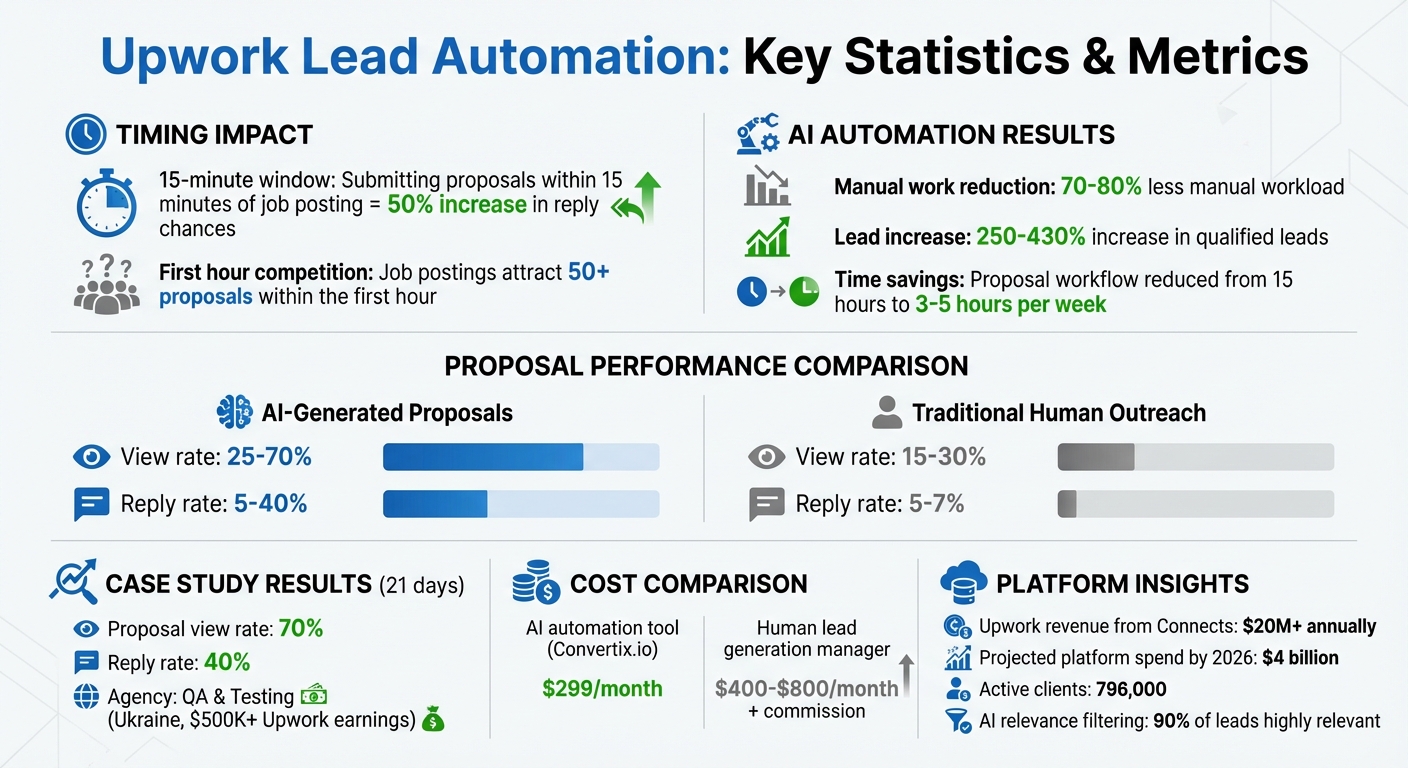
- Speed matters: Submitting proposals within 15 minutes of a job posting increases your chances of a reply by 50%.
- AI tools: These systems monitor job feeds 24/7, filter opportunities based on your expertise, and send tailored proposals automatically.
- Results: Agencies using AI report up to 70% less manual work, a 250–430% increase in leads, and significant cost savings.
Upwork Lead Automation Statistics and Performance Metrics
Build An Ai UpWork Outreach Bot in Under 10 Minutes (N8N Template)
sbb-itb-5c5517e
How Upwork Lead Generation Works
Upwork stands out from other freelancing platforms because of its unique structure and competitive dynamics. Success here requires a clear understanding of its system. Unlike platforms with flat fees, Upwork uses a “Connects” economy – a paid virtual currency used for submitting bids. Since every proposal costs Connects (and therefore money), targeting the right opportunities becomes critical. Interestingly, Upwork makes over $20 million annually just from selling Connects. This approach demands precision and quick decision-making from agencies.
Behind the scenes, Upwork uses metrics to rank freelancers. Two key metrics include the Engagement Consistency Score (ECS), which tracks how often you log in and respond to messages, and the Relevance Confidence Index (RCI), which evaluates how closely your profile aligns with the job categories you target. For example, applying to unrelated categories like Design and SEO might lower your ranking because the system struggles to categorize your expertise.
What Makes Upwork Different from Other Platforms
Timing is everything on Upwork. Job postings often attract over 50 proposals within the first hour. Submitting your proposal within the first 15 minutes dramatically improves your chances of being noticed. This fast-paced environment makes automation tools incredibly valuable. These tools can monitor job feeds 24/7 and submit proposals within minutes – even during weekends or overnight.
Another challenge is Upwork’s “Other Proposals” filter. If your proposal doesn’t align closely with the job’s requirements – whether due to mismatched skills, work history, or missing keywords – it could end up hidden in the “Other” tab, out of immediate view. This makes it essential to tailor both your profile and proposal to the job’s specifics.
“Upwork quietly monitors how often clients reply to your proposals. Too many ignored proposals = system lowers your trust weight temporarily.” – Simranjit Kaur
The first two lines of your proposal are especially important. These are the only lines clients see in their dashboard, so they need to grab attention. Addressing a specific pain point or offering a quick solution can make all the difference. As Emmanuella Ezedioranma puts it, “The first 2 lines [of a proposal] address client pain points… This takes 5 minutes of research. But it separates you from 90% of applicants”.
How to Qualify Job Opportunities
Once you understand how Upwork operates, the next step is identifying which jobs are worth pursuing. Not every posting deserves your time – or Connects. Start by defining your Ideal Customer Profile (ICP). Many agencies train AI systems to identify relevant jobs by manually selecting opportunities that fit their ICP, allowing the AI to prioritize high-quality leads over time. This method can result in up to 90% of leads being highly relevant.
When evaluating a job posting, look at the client’s history. Check their past spending, hiring rate, and reviews from other freelancers. Avoid listings that are vague, underfunded, or have no client history, as these are less likely to convert and may waste your Connects. Modern automation tools often feature machine learning systems to filter out fake or scam job posts.
Budget transparency is another key factor. Jobs with clearly defined scopes and realistic budgets are more likely to lead to successful outcomes. AI-generated proposals that incorporate details from both your profile and the job description can double your chances of getting a response compared to manual submissions. And remember, applying early gives you a significant edge before the competition heats up.
| Quality Indicator | Details |
|---|---|
| Client History | Look for previous spending, a high hiring rate, and positive freelancer reviews |
| Job Clarity | Clear scope, realistic budget, and specific requirements |
| Timing | Submit your proposal within 15 minutes for better visibility |
| Category Match | Ensure your profile aligns with the job’s specialty |
| Red Flags | Avoid vague descriptions, extremely low budgets, or clients with no history |
Using AI to Automate Lead Generation
Tackling the inefficiencies of manual lead generation, AI-powered automation reshapes the process by introducing accuracy and speed. Instead of spending hours scanning job boards and drafting proposals, AI tools handle these tasks 24/7 – identifying opportunities, crafting custom responses, and analyzing what resonates. The results? Agencies can reduce their manual workload by as much as 70–80%. Timing is critical here, as applying within the first 15 minutes boosts your chances of a reply by 50% compared to waiting over an hour. In the fast-paced world of lead generation, this edge can be a game-changer. Let’s dive into how AI aligns job opportunities with your agency’s expertise. This is a core component of a modern lead generation strategy for Upwork agencies.
AI-Powered Job Matching
AI job matching goes beyond basic filters like keywords, budget, and location. These systems use semantic understanding to grasp the intent behind job descriptions, moving past surface-level matches. You can guide the AI with straightforward instructions like “avoid urgent tasks” or “focus on fixed-price projects over $1,000”, and it ranks each opportunity based on your criteria.
What sets this apart is the integration of portfolio analysis. AI tools review your case studies and tech stacks to identify whether your agency’s expertise aligns with a client’s needs. For example, if a job calls for React development and your portfolio highlights several React projects, the system marks it as a top match. Services like Convertix.io deliver this functionality for $299 per month, a fraction of the $400–$800 plus commission typically spent on human lead generation managers. Instant notifications via Slack or Telegram ensure your team can act on high-value leads without delay.
Creating Personalized Proposals at Scale
Generic proposals won’t cut it on platforms like Upwork – clients can easily spot boilerplate responses. AI solves this by drawing from your portfolio to craft proposals that feel personal. Instead of saying, “We have experience in web development”, the AI might write, “We recently built a similar e-commerce platform for [Client Name] using Shopify and React – here’s the live URL.” Tasks that used to take hours now take just minutes.
The efficiency speaks for itself. AI-generated proposals often see a 25–30% view rate and a 5–15% reply rate, outperforming traditional human-led outreach, which averages 15–30% views and 5–7% replies. Faster submissions and better relevance matching are key contributors to this boost. Some agencies leveraging advanced AI tools report even higher success rates, with view rates reaching 70% and reply rates climbing to 40%.
“Convertix reduced our proposal workflow from 15 hours to about 3–5 hours per week and made scaling our Upwork outreach much easier.” – Zoha, Co-Founder, Skip The Noise Media
For custom client questions, the AI either provides a default response or flags the query for manual review. This hybrid approach ensures proposals keep moving while maintaining quality. Plus, since these tools operate through real browser environments rather than API calls, they remain fully compliant with Upwork’s Terms of Service.
Performance Analytics and Tracking
AI doesn’t just automate tasks; it also provides deep insights into performance. A centralized dashboard tracks your entire lead generation funnel – view rates, reply rates, and conversion rates – broken down by job type, cover letter template, and individual team members. For instance, if a template gets high views but low replies, you’ll know the opening is strong, but the content needs refining. On the other hand, a template with balanced views and replies signals a winning formula.
Convertix.io offers this level of analytics for $299 per month, compared to the $400–$800 plus commission cost of human managers. Real-time feedback allows you to make quick adjustments. If view rates drop or replies are high but conversions lag, you can tweak your filters, refine proposals, or adjust follow-ups. The goal is actionable insights – not vanity metrics – so you can refine your strategy and scale what works best.
Staying Compliant While Using Automation
AI can make lead generation on Upwork much smoother, but staying within Upwork’s rules is non-negotiable. According to their Terms of Service, using unauthorized automated scripts that interfere with how the platform operates is prohibited. The trick is to use automation tools that replicate human behavior instead of relying on headless scripts that are easily detected.
How to Avoid Platform Violations
To stay compliant, start by pacing your activity. Submitting a large number of proposals within minutes is a red flag. Effective automation tools spread out submissions to mirror human actions. Another key step is maintaining regional IP integrity. Avoid using data center IPs, as these are often flagged. Instead, compliant tools rely on stable, residential IPs and verified browser environments to reduce detection risks.
Additionally, incorporating AI-driven relevance filtering can help ensure your proposals are targeted and appropriate. This step minimizes the chance of spamming unsuitable leads, which could lead to account issues.
Once you’ve addressed these safety measures, the next step is choosing the right automation tools.
Selecting Safe Automation Tools
Not all automation tools are equal when it comes to compliance. Tools that rely on APIs to bypass the standard user interface are riskier since Upwork actively monitors API activity. Platforms like Convertix.io stand out because they avoid direct API use. Instead, they operate through real browser sessions using proprietary technology, which mimics genuine account activity. This approach, combined with verified browser environments, helps protect against account suspensions.
Convertix.io also provides private demos to explain its safety measures, keeping details confidential to maintain the effectiveness of their methods. At $299 per month, this tool offers a cost-effective alternative to hiring human lead generation managers, which can cost $400–$800 per month, plus commission.
“100% safe – no account blocking or suspension risk.” – Convertix.io
Before selecting any tool, ensure it uses portfolio-based AI to craft personalized cover letters that reflect your agency’s work, rather than relying on generic templates. Some tools even offer instant notifications through Slack or Telegram, allowing you to manually step in when a client question arises. This added layer of oversight helps maintain compliance while scaling your efforts.
Next, discover how to pair automation with strategic profile and community optimization to elevate your success on Upwork.
Combining Automation with Other Growth Strategies
Successful agencies know that automation works best when combined with a strong profile, precise filters, and consistent engagement. These elements create a solid foundation for making the most of automation.
“The tools don’t replace the work. They amplify your process.” – Alex Claudovich, Founder, UNeverSleep
Before diving into automated outreach, ensure your profile is polished and professional. When a potential client receives an automated proposal, they’ll likely check your profile to confirm your credibility. If your profile feels incomplete or generic, even the most well-crafted proposal may fall flat. Companies that invest in AI-driven personalization can see up to 40% more revenue.
Optimizing Your Profile for Better Visibility
Your Upwork profile acts as your digital storefront, converting proposal views into meaningful conversations. A well-crafted profile not only draws clients in but also reinforces the effectiveness of your automated proposals.
Turn your portfolio into a showcase of success by creating concise case studies. Highlight the problem your client faced, the solution you provided, and the measurable outcomes. This approach builds trust far more effectively than generic work samples.
Leverage tools like Perplexity to refine your profile. Take screenshots of your Title, Description, Tags, and Portfolio sections, and ask the AI to “improve each block to make it more attractive and searchable for potential clients”.
For agencies, consistency across team profiles is key. Use professional headshots and align descriptions to present a cohesive image. Titles like “Senior Developer at [Agency Name]” give the impression of a unified team rather than a group of freelancers, which can boost client confidence.
Client reviews and strategic keyword use are also critical. Upwork’s Relevance Confidence Index (RCI) evaluates how well your work history aligns with the jobs you pursue. Staying focused on your niche improves your ranking, while applying for unrelated jobs can hurt your visibility. A strong profile enhances the impact of targeted filters and outreach.
Using Upwork Filters and Categories Effectively
Filters are essential for ensuring your automation tools focus on high-quality leads. Before setting up automation, define 2–4 specific “lanes” based on your services, industries, and tools. For instance, you might focus on “GA4 setup for B2B SaaS companies using React.” This clarity can eliminate up to 90% of irrelevant job posts.
Refine your searches with advanced operators. Use quotation marks for exact phrases (e.g., “core web vitals”), OR for variations (e.g., react OR “next.js”), and a minus sign to exclude irrelevant terms (e.g., -homework, -student, -unpaid).
Target jobs with high-intent signals like Payment Verified statuses, fewer than five proposals, and clients with four or more past hires. Save 3–6 searches for your defined lanes and enable notifications for real-time alerts. Automation tools can then monitor these searches continuously, ensuring you never miss an opportunity.
“Think of filters as your targeting layer; proposals are your creative. Get the targeting right, and the rest gets easier.” – Vadym Ovcharenko
Make it a habit to review and fine-tune your filters weekly. Every Friday, archive searches that aren’t performing well and update negative keywords to filter out irrelevant postings. Spending just 15 minutes on this can keep your automation focused on the best opportunities.
Building Your Reputation Through Community Engagement
While automation can streamline processes, personal engagement adds the human touch that builds trust and secures high-value clients. Upwork measures an Engagement Consistency Score (ECS), which tracks how often you apply to jobs, respond to messages, and log hours. A high ECS can boost your profile’s visibility, even if you already have a perfect Job Success Score (JSS).
To maintain a strong ECS, log in daily and reply to leads promptly. This consistent activity signals reliability to Upwork’s algorithm. Agencies combining this approach with automation have reported a 300% increase in qualified leads and an 85% reduction in time spent writing proposals.
Once a client responds to an automated proposal, take it a step further by sending a 2–3 minute Loom video. This personalized touch helps build immediate credibility and bridges the gap between automation and securing a discovery call.
Staying focused on a single niche ensures your automation efforts align closely with client needs.
“Upwork doesn’t just see what you do – it tracks how consistent, relevant, and responsive you are. That’s why strategy now matters more than skills.” – Simranjit Kaur, Upwork Strategist
With Upwork projected to surpass $4 billion in platform spend by 2026 and hosting around 796,000 active clients, the potential is enormous. The key to success lies in combining automation with a well-optimized profile, smart filtering, and consistent engagement – not relying solely on tools.
Conclusion
Automation enhances your ability to implement effective practices. Agencies achieving success on Upwork aren’t just relying on AI and hoping for the best – they’re blending 24/7 automated job matching with well-optimized profiles, carefully chosen filters, and authentic client interactions. This balanced approach is what sets apart agencies that grow steadily from those that struggle to keep up.
For example, Convertix.io shows how AI can take over repetitive tasks like scanning jobs within minutes of posting, generating proposals tailored to your portfolio, and monitoring performance metrics. Meanwhile, you can focus on closing deals and fostering client relationships. In 2024, a QA & Testing agency based in Ukraine, with over $500,000 in Upwork earnings, achieved a 70% proposal view rate and a 40% reply rate in just 21 days using this strategy. This demonstrates how automation can complement and strengthen your overall approach.
The process typically involves a setup period of 1-2 weeks, followed by 2-3 months of fine-tuning. Agencies frequently report a significant decrease in manual workload during this time. However, it’s critical to prioritize compliance – use tools that operate through real browsers to ensure your account remains secure.
Take one actionable step today. Set up saved searches with accurate filters aligned to the AI-driven methods discussed earlier, or review your profile with the optimization tips shared. Keep track of your proposal view rates, reply rates, and time saved. By the end of 30 days, you’ll have solid data to identify what’s working and where to focus your efforts.
FAQs
How do I train the AI to match my ideal clients on Upwork?
To make the AI on Upwork align with your ideal clients, start by clearly defining your target client profile. Set up your job preferences to reflect the types of projects and clients you want to work with. Then, build a portfolio that showcases your expertise and relevant work. Take the time to customize cover letter prompts so they align with your niche, skills, and preferred project types.
By providing detailed information about your preferences and portfolio, the AI can better identify and prioritize opportunities that fit your goals. This approach simplifies your outreach process and improves the accuracy of lead matching.
How can I automate proposals without risking an Upwork ban?
To automate proposals on Upwork without risking your account, consider using tools such as Convertix.io. These platforms are designed to align with Upwork’s rules, offering features like automated bidding and personalized proposals that reflect your portfolio. This approach helps you avoid sending generic, spam-like submissions that could lead to penalties.
Take advantage of customization options like setting job preferences and crafting tailored cover letter prompts to ensure your proposals stay relevant and professional. Additionally, keep an eye on analytics to track engagement patterns and make adjustments as needed, reducing the likelihood of any account-related problems.
What metrics should I track to improve reply and close rates?
Tracking reply rates, open rates, and conversion rates is key to understanding how well your outreach efforts and closing strategies are performing. By keeping an eye on these metrics, you can gauge the success of your client interactions and spot areas where adjustments could lead to stronger results. This kind of monitoring gives you actionable insights to fine-tune your approach and improve outcomes over time.
