
Freelancers on Upwork in 2026 are saving hours and increasing earnings by automating repetitive tasks like job searches, proposal drafting, and client communication. With over 50 proposals flooding job posts in the first 24 hours, speed and precision are critical. Automation tools help you focus on work that matters while staying ahead of the competition.
Key Insights:
- Job Discovery: AI tools monitor job feeds 24/7, scoring opportunities based on your skills and preferences.
- Proposal Writing: AI drafts personalized proposals in minutes, but manual review ensures compliance with Upwork rules.
- Client Communication: Automation tracks responses and sends timely follow-ups to improve your proposal-to-interview rate.
- Payment Management: Automatic withdrawal schedules and milestone tracking reduce admin workload.
Automation can save freelancers 7–22 hours weekly, boosting income by up to $13,500 annually. However, staying compliant with Upwork’s rules is essential – manual review and submission of proposals are required. By combining automation with human oversight, you can land better gigs faster while maintaining quality and professionalism.
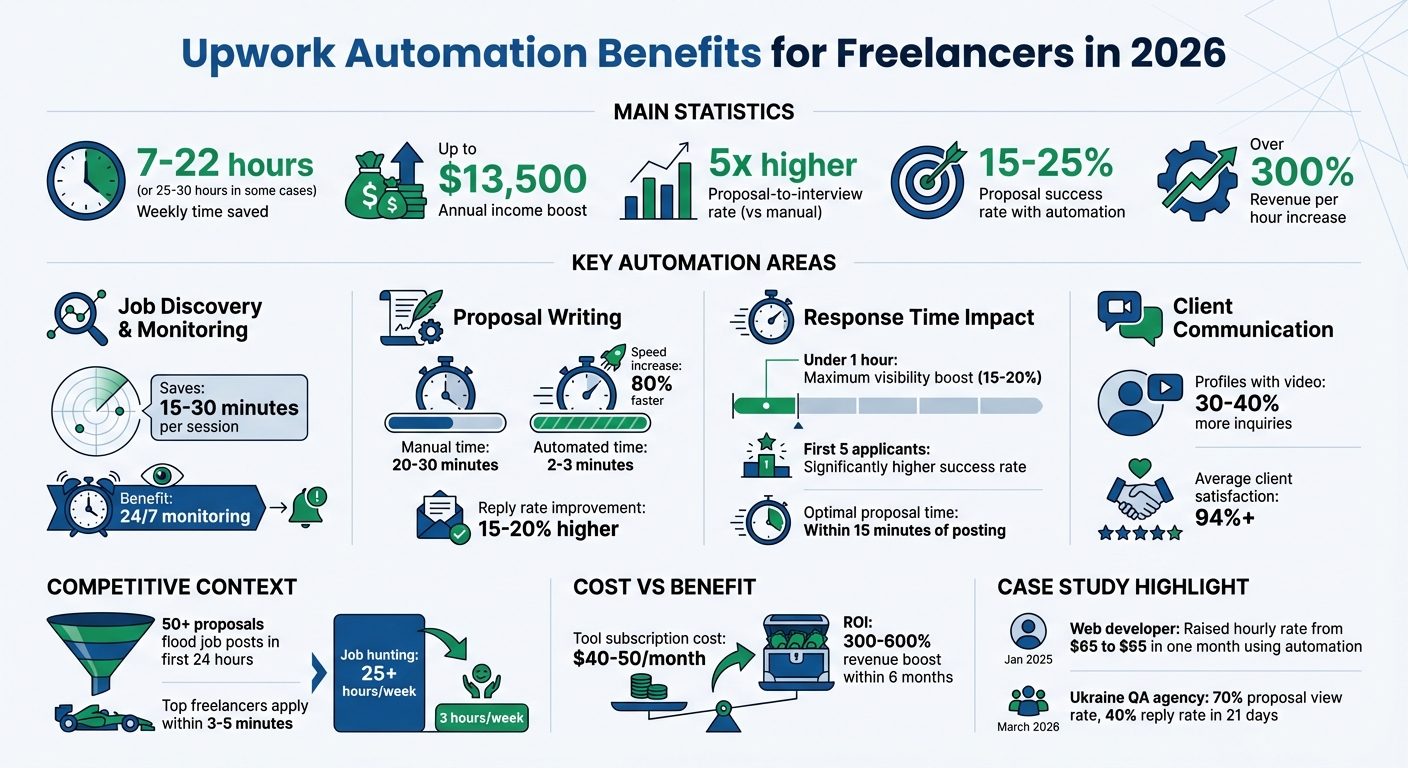
Upwork Automation Benefits: Time Savings and Income Impact for Freelancers in 2026
I Built An AI Agent That Automates Upwork ($500K+ Earned)
sbb-itb-5c5517e
What You Can Automate on Upwork in 2026
By 2026, automation on Upwork has advanced well beyond basic job alerts. Freelancers now rely on AI-driven tools to take care of tasks like real-time job monitoring, drafting tailored proposals, and managing client interactions. These tools handle repetitive tasks, giving you more time to focus on creative and strategic efforts. Let’s explore how automation can simplify your workflow.
Main Tasks You Can Automate
Automation works best for tasks that are routine and time-consuming but don’t require creative input. Here’s how AI tools can help:
Job discovery and monitoring:
With Upwork discontinuing native RSS feeds in 2024, freelancers now use third-party tools that continuously scan job feeds and send updates via Slack, Telegram, or email. This eliminates the need for manual refreshing, saving 15–30 minutes per session.
Job filtering and scoring:
AI tools analyze job posts and score them on a 1–10 scale based on factors like your skills, the client’s spending history, budget, and project details. Jobs that score 60% or higher in relevance are flagged for your review.
Proposal generation:
AI can draft personalized proposals in just minutes, compared to the 20–30 minutes it takes to write one manually. These tools pull from your portfolio and past work, using proven frameworks like "Hook–Problem–Plan–Proof–CTA" to craft compelling pitches. However, Upwork’s Terms of Service require you to review and manually submit each proposal.
Pipeline tracking and CRM:
Automation tools track when clients view your proposals, monitor response rates, and send reminders to follow up on leads. This keeps your pipeline organized and ensures no opportunity slips through the cracks.
Payment and milestone management:
AI scheduling systems can track project phases and send payment reminders. While automation simplifies this process, manually verifying transactions ensures everything runs smoothly and securely.
By automating these tasks, you not only save time but also position yourself to focus on higher-value work, such as building relationships and delivering top-notch results.
How Automation Helps Freelancers
The benefits of automation go far beyond time savings. In a competitive environment where top freelancers apply within 3–5 minutes of a job posting, speed can make all the difference in landing interviews. Freelancers using automated systems report a proposal-to-interview rate that’s five times higher than those relying on manual methods. This allows you to prioritize quality over quantity, as highlighted by OpenProposal:
"For a solo freelancer building a reputation, sending 5 exceptional proposals beats sending 50 mediocre ones. Use AI to write better, not just faster."
- OpenProposal
How to Automate Job Discovery and Filtering
Hunting for jobs on Upwork manually can be a serious time drain. Sifting through countless posts often means opportunities slip through the cracks. Automation flips the script by keeping an eye on job boards 24/7 and delivering only the roles that fit your criteria.
Setting Up Job Filters and Alerts
Start by identifying your "bidding lanes" – 2 to 4 niches where you excel, such as React dashboards, B2B SaaS, or Next.js projects. This focus makes your filters more precise.
Upwork’s search tools can help you refine results further. Use advanced operators to narrow down your searches. For example:
- Wrap exact phrases in quotes (e.g., "core web vitals").
- Connect synonyms with OR.
- Exclude unwanted terms with a minus sign (e.g., -homework, -assignment).
You can also adjust filters for experience levels, budgets, and verified client histories. Target jobs with fewer than five proposals for better visibility.
Create 3 to 6 saved searches tailored to your niches, like "Shopify Speed – DTC – $500+." Enable mobile push notifications to get real-time updates. Make it a habit to review and tweak your filters weekly. Archive searches that aren’t performing, update negative keywords to filter out spam, and adjust budget thresholds as needed. As Vadym Ovcharenko from GigRadar explains:
"Filters cut noise and give you a clear path to better jobs, faster."
This regular maintenance can save you 5 to 10 hours that might otherwise be wasted on endless scrolling. Once your filters are fine-tuned, AI tools can take your job search to the next level.
Using AI Tools to Find Jobs
With Upwork discontinuing native RSS feeds in 2024, AI tools like Convertix.io have stepped in to simplify job discovery. Convertix.io monitors job feeds continuously and sends matching opportunities directly to platforms like Slack, Telegram, or your CRM, removing the need for manual browsing.
These AI tools go beyond simple keyword matching. They analyze your portfolio and score jobs on a 0–100 scale based on factors like client spending, payment history, scope clarity, and technical fit. Jobs with high scores are flagged for your attention. For instance, in March 2026, a Ukraine-based QA agency with over $500,000 in Upwork earnings used Convertix for just 21 days, resulting in a 70% proposal view rate and a 40% reply rate.
You can also set up AI validation prompts to further refine results. For example, instruct the tool to prioritize: "Only React projects over $1,000 from verified clients with 4+ hires." This ensures your proposals are sent within 10 minutes of job postings, increasing the likelihood of client engagement. By combining well-optimized alerts with AI tools, you can keep your feed relevant without constant adjustments and position yourself as one of the first applicants when clients are most active.
Freelancers who use this mix of filters and automation typically save about 7 hours per week.
How to Automate Proposal Writing
Writing proposals manually can take up to 25–35 minutes, but automation can slash that time to just 2–3 minutes – without losing the personal touch. The key is to create a system that handles the repetitive tasks so you can focus on the details that close deals.
Building Proposal Templates
Successful proposals tend to follow a five-part structure:
- Hook: Grab attention right away.
- Problem Acknowledgment: Show you understand the client’s needs.
- Solution/Plan: Outline clear milestones or deliverables.
- Proof: Include specific metrics or results.
- Call to Action: Encourage the client to take the next step.
Keep your proposals concise – ideally between 150–250 words. Anything longer might give the impression that you’re not respecting the client’s time.
Start by creating templates with placeholders for details that change with each project, like {{Client Name}}, {{Specific Problem}}, {{Tool/Software}}, and {{Timeline}}. For added flexibility, create modular snippets for different services you offer. For example, you might have one block for SEO blog posts and another for landing page copy, making it easy to customize the "Solution" section of your template.
Another tip: build a collection of 8–12 short portfolio blurbs (80–120 words each), tagged by skill or industry. This allows you to quickly insert relevant examples into your proposals. As one Upwork user, u/Deep_Addvertising_446, shared:
"Something that really helped me when I was struggling with low proposal views was building a consistent proposal system instead of rewriting everything from scratch."
This structured approach provides the foundation for using AI to add personalized details in the next step.
Using AI to Personalize Proposals
AI tools can help draft proposals up to 80% faster. One way to start is by having AI summarize the job posting into a brief (100–150 words) that highlights key deliverables, tools, and success criteria. This ensures your proposal aligns with the client’s specific needs.
Here’s where the 80/20 rule comes in: let AI handle the formatting and general structure, while you focus on the crucial 20% – like adding specific past results, adjusting the tone, and linking relevant portfolio pieces. Tools like Convertix.io can even analyze your portfolio and automatically pull in the most relevant case studies for each proposal.
Once you have a draft, spend about 90 seconds reviewing it to fine-tune the tone and double-check for accuracy. To make your proposal stand out, include at least two details from the job post – such as mentioning a specific tool or deadline – right in the opening lines. This shows the client that your proposal isn’t generic. Match the client’s tone and language, and finish with a thoughtful project-related question to encourage a response.
Freelancers who use AI-assisted proposals report 15–20% higher reply rates than those using manual methods, as long as personalization is included. The bottom line? Clients aren’t opposed to automation – they just want to feel like the proposal was written for them.
How to Automate Client Communication
Quick response times are essential – they can influence your Upwork rankings by 15–20%. Answering within an hour gives you the best visibility boost, while delays beyond 24 hours can negatively affect your profile. But staying responsive without being available 24/7 is a challenge. This is where automation can help, particularly with personalized follow-ups, building on earlier AI tone matching for proposals and automation strategies.
Creating Automated Follow-Up Messages
Just like automating proposals can save time, automating parts of your client communication can improve your responsiveness without sacrificing quality.
One effective approach is to use a "human-in-the-loop" strategy: let AI draft follow-up messages, but always review and send them manually. As OpenProposal emphasizes:
"The red line is: did a human review and consciously submit each proposal? If yes, you’re compliant. If the tool submits automatically, you’re not."
When you’re unavailable, an auto-response can help maintain response metrics. For example, you could send a quick message like: "I’m in a meeting until 3pm EST; I’ll reply in detail soon". This keeps communication open without compromising quality.
You can also use CRM tools to track client activity and trigger personalized follow-ups. For instance, if a client views your proposal page, send a message that references their specific project. AI transcription tools like Otter can also streamline follow-ups by converting meeting notes into actionable emails.
| Response Time | Impact on Visibility | Client Perception |
|---|---|---|
| Under 1 hour | Maximum boost | Extremely responsive |
| 1–4 hours | Strong boost | Very responsive |
| 4–12 hours | Moderate boost | Responsive |
| 12–24 hours | Neutral | Acceptable |
| 24+ hours | Negative impact | Slow, potentially busy |
Push notifications on the Upwork mobile app can help you acknowledge messages quickly. Even a brief reply like "Got it – I’ll send a detailed response in two hours" can maintain strong response metrics while giving you time to craft a thoughtful reply.
Maintaining Message Personalization
Speed is important, but keeping your messages personal is just as critical.
Upwork’s spam detection algorithms flag generic, repetitive templates. To avoid this, use AI to draft the basic structure of your messages, but spend a minute or two adding specific details about the client’s project or previous conversations. This small effort makes a big difference.
Tools like TextExpander can help you store reusable snippets, but always customize them with client-specific information. Mention their industry, address their challenges, or reference something from their profile to show genuine interest.
Dr. Gabby Burlacu, Senior Research Manager at Upwork, highlights how professionals can benefit from combining AI with their personal expertise:
"Professionals who can direct and refine AI outputs to enhance their work will stand out and find success."
Setting clear response expectations in your profile or initial messages can also help. For example, you might state: "I typically respond within 2–4 hours during business hours." This transparency helps manage client expectations while giving you space to work.
For important prospects, consider adding a personal touch with AI video tools like Lumen5. Profiles with video introductions tend to receive 30–40% more client inquiries. A short, personalized video feels far more engaging than plain text and can leave a lasting impression. While efficiency is key, creativity and thoughtful communication remain highly valued by clients.
How to Automate Payment and Milestone Tracking
Managing payments manually can eat up valuable time. Automating payment schedules and milestone tracking lets you focus on more important tasks. Upwork includes built-in tools to handle withdrawals and track milestones, cutting down on admin work and helping ensure timely payments.
Automating Payment Schedules
Upwork makes automating payments straightforward. You can set up automatic withdrawals to your bank account, PayPal, or Payoneer on the following schedules:
- Weekly (every Wednesday)
- Twice a month (1st and 3rd Wednesdays)
- Monthly (last Wednesday)
- Quarterly (last Monday of each quarter)
To set this up, go to Account Settings > Withdrawals. Here, you can also set a minimum withdrawal threshold – like $100 – to reduce per-transfer fees. Additionally, you can configure a reserve balance of up to $250 to cover costs like Connects or membership fees.
For hourly contracts, earnings become available 10 days after the workweek ends. This aligns well with the weekly Wednesday withdrawal schedule for consistent cash flow. For fixed-price contracts, milestone payments are released five days after client approval. If you need funds sooner, you can use the manual "Withdraw Now" option.
One important note: Upwork automatically withdraws any funds that remain in your account for 180 days, regardless of your set schedule or minimum threshold.
Once your payment schedule is automated, the next step is to ensure your transactions are secure.
Keeping Automated Payments Secure
Security is key when automating your financial processes. While automation simplifies payments, following Upwork’s security guidelines helps protect your earnings. For example, Upwork enforces a three-day security hold on newly added or updated withdrawal methods to safeguard your funds. Also, make sure the name on your bank account matches your verified Upwork name exactly – any discrepancies can result in delays or rejected transfers.
For fixed-price contracts, only automate payments after the milestone is marked "Funded" in escrow. Funds promised outside of escrow aren’t protected by Upwork. Always use the "Submit Work for Payment" button to trigger the 14-day review period. If the client doesn’t respond during this time, the funds are automatically released to you.
For hourly contracts, use the Upwork Desktop App to log time with screenshots and activity memos. Manual time entries won’t qualify for Hourly Payment Protection. Lastly, keep all payment discussions, file deliveries, and milestone agreements within Upwork’s platform. This keeps a clear record in case of disputes.
Tracking Your Automation Results
Once you’ve implemented automation strategies, keeping tabs on your results is key to improving performance. Tracking ensures you’re achieving time savings, gaining clients, and identifying missed opportunities. Without this, it’s tough to hold yourself accountable or make informed adjustments.
Metrics to Track
Start with proposal efficiency. Look at how many of your proposals lead to interviews. A solid automation setup typically achieves a 15–25% proposal success rate. Falling below this range? It might be time to tweak your job filters or refine your proposal hooks.
Next, measure time savings, which are just as important as financial gains. Freelancers using automation often save 25–30 hours per week on repetitive tasks. But those saved hours should translate into more billable work. Done right, automation can increase your revenue per hour by over 300%.
Don’t overlook response speed, as it directly impacts your success rate. Being among the first five applicants significantly boosts your chances of landing a job. Ideally, you should aim to send proposals within 15 minutes of a job posting. If you’re consistently taking 60–90 minutes, it might be time to adjust your automation alerts.
Keep an eye on your Job Success Score (JSS), which is calculated over 6-, 12-, and 24-month periods. Poor job matches from automation can hurt your score, and recovery could take 3–6 months of focused manual effort. Additionally, your client satisfaction score should stay high – an average of 94% or more is a good benchmark, as automation often improves consistency.
Financial metrics like Revenue per Proposal (RPP) are also crucial. Calculate this by dividing your total revenue by the number of proposals sent. Don’t forget to factor in costs, such as Connects (around $0.15 each), tool subscriptions (typically $40–$50/month), and the time spent reviewing AI drafts. A $40–$50 monthly investment in automation can yield a 300–600% revenue boost within six months.
These metrics provide the foundation for improving your workflows.
Using Analytics to Improve
Dive into your metrics to find areas for improvement and boost your conversion rates.
Think of your automation process as a funnel: qualified jobs viewed → proposals sent → client responses → interviews → offers → hires. Each stage helps identify where you’re losing opportunities. For instance, a low response rate might mean your opening hook isn’t engaging enough or your job filters are too broad. On the other hand, a low interview rate – despite decent responses – could point to the need for more targeted project plans.
Run weekly experiments to fine-tune your approach. Change one variable – like your opening hook or call-to-action – while keeping everything else constant for 20–30 proposals. This method helps uncover what works best. In specialized niches, freelancers often see a 20–40% response rate, a 10–25% interview rate, and a 3–10% overall win rate.
If you work across multiple niches, such as Shopify optimization or React dashboard development, compare which workflows generate the highest Revenue per Proposal. This comparison can help you refine your filters for better results.
Many automation tools come with advanced analytics that show when clients view your proposals, allowing you to time manual follow-ups effectively. Integrating these tools with a CRM system can provide even more comprehensive tracking.
Finally, consider the "70/30" rule for your automation strategy: automate 70% of tasks like job discovery, drafting, and tracking, while reserving 30% for human oversight, such as final reviews and handling complex communications. Tools with sentiment analysis can flag client messages that need a personal touch, ensuring you maintain the human element where it matters most. The goal isn’t to replace human effort but to focus it on the tasks that add the most value.
Staying Compliant with Upwork’s Rules
After diving into automation techniques, it’s crucial to stay aligned with Upwork’s rules to protect your hard work. Automation is only beneficial when it operates within Upwork’s guidelines. Breaking the platform’s Terms of Service can result in warnings, account restrictions, or even permanent bans. In fact, suspension rates rose by 23% in 2025, leading to significant income losses for freelancers and discouraging 89% of clients from continuing on the platform. Knowing where the boundaries lie helps protect both your account and your earnings.
Upwork’s Automation Guidelines
Upwork is clear about its stance: automation can assist your workflow, but manual review and submission are non-negotiable. AI tools can help draft proposals or filter jobs, but you must personally review and submit each one.
Some activities are strictly off-limits, such as auto-submitting proposals in bulk, mass messaging, using auto-responses, scraping client data, sharing login credentials with tools, and bypassing security features like CAPTCHAs. If you frequently encounter "Are you human?" prompts or rate-limit errors, your automation might be flagged as bot-like behavior, which puts your account at risk.
To stay safe, consider practices like routing job alerts to Slack or email, using AI tools to draft proposals (but reviewing them yourself), tracking leads in a CRM, and analyzing performance data. Upwork also provides an official API for approved developers, but this doesn’t grant permission to spam or scrape data.
As of January 5, 2026, Upwork has automatically opted all users into AI training. This means your proposals, messages, and deliverables could be used to train Uma, Upwork’s AI assistant. To safeguard your intellectual property, go to Settings → AI Preferences and turn off options like "Work Product Data", "Communications Data", and "Other Platform Data." For highly sensitive contracts, both you and your client must opt out.
By following these guidelines, you can scale your automation efforts confidently while keeping your account secure and productive.
Why You Still Need to Monitor Automation
Even when automation complies with Upwork’s rules, it still needs your oversight. Tools can misinterpret job descriptions, create awkward phrasing, or link to outdated portfolio items. Spend 90 seconds reviewing each AI-generated draft to ensure the tone, accuracy, and attachments are correct.
Perform quarterly audits to identify and disable tools that log in or auto-submit on your behalf. Remember, Upwork holds you accountable for any violations, not the tool provider. If you’re increasing automation, start with a 70% manual and 30% assisted workflow, gradually scaling up to avoid triggering spam detection.
Lastly, set regular reminders to revisit Upwork’s Terms of Service, as policies around AI and data usage are constantly evolving. Automation should enhance your work, not replace your judgment, allowing you to focus on tasks that truly require your expertise.
Conclusion
Automation lets you focus your skills where they matter most – on tasks that bring real value. The freelancers landing the top Upwork jobs in 2026 aren’t spending 25+ hours a week manually searching for work. Instead, they’ve built systems that handle the heavy lifting – finding, filtering, and drafting proposals around the clock. This shift has cut their time spent on job hunting down to just 3 hours per week, saving them over $13,500 annually in billable hours.
To get started, import your profile into an automation platform, set up 2–3 job trackers tailored to your main niches, and let AI handle the drafting of your initial proposals. For example, in January 2025, a web developer implemented an automated system to apply for jobs. Within a month, he secured enough work to raise his hourly rate from $65 to $95 while keeping his schedule fully booked. His success was largely due to ensuring his proposals were among the first high-quality ones seen by clients.
Once your system is in place, regular monitoring is key. Each week, review which types of jobs are leading to interviews and measure your proposal conversion rates. Use this data to fine-tune your criteria and improve your AI templates. Freelancers who pair automation with human oversight report much higher proposal-to-interview rates.
FAQs
What Upwork tasks are safe to automate without risking my account?
Safe tasks to automate on Upwork revolve around job discovery and lead generation. You can use AI-powered filters, alerts, and approved tools to streamline job matching and receive notifications. However, automating actions like proposal submissions, bidding, or client communication is strictly against Upwork’s Terms of Service. To ensure compliance, stick to tools that help you identify opportunities, but handle proposals and client interactions personally to maintain trust and professionalism.
How do I set up automation so I apply fast but still send personalized proposals?
To send personalized proposals quickly, leverage AI tools to draft messages tailored to specific job descriptions and client details. Always review and fine-tune these drafts before submission to ensure they meet your quality standards. Keep your proposals short and to the point, referencing specific details from the job post to show genuine interest. Avoid overwhelming clients by limiting the number of submissions you send each day, as this helps maintain credibility. Finally, track metrics like your interview rate to adjust your strategy and strike the right balance between speed and personalization.
Which metrics should I track to prove my automation is improving results?
Track essential metrics such as your Job Success Score (JSS), proposal response rate, client feedback, time savings, and bid success rate. These numbers give you a clear picture of how automation impacts your performance and boosts productivity.
