
When bidding on Upwork, measuring your proposal conversion rates is critical to improving your results. Your success funnel includes three key metrics: Response Rate (client replies), Interview Rate (shortlist invitations), and Win Rate (hires). By analyzing these, you can identify what’s working and refine your approach.
Here’s a quick breakdown:
- Response Rates: Track how many clients reply to your proposals. Aim for 20–40% depending on the niche.
- Interview Rates: Measure how often you’re shortlisted. A good benchmark is 10–20%.
- Win Rates: Focus on hires per proposal. Agencies should target 5–12% as a baseline, with 10–20% being a stretch goal.
- Revenue Per Proposal (RPP): Average revenue generated per bid. Mixed projects typically yield $80–$250; high-ticket work can range from $250–$800+.
- Cost Per Proposal (CPP): Calculate costs like Connects, time spent, and tools. Ensure your RPP exceeds CPP by 5–10× for profitability.
Automation tools like Convertix.io can simplify tracking, automate proposal creation, and provide real-time dashboards to optimize your efforts. Freelancers and agencies using such tools often see higher reply rates (8–30%) and win rates (5–10× platform averages).
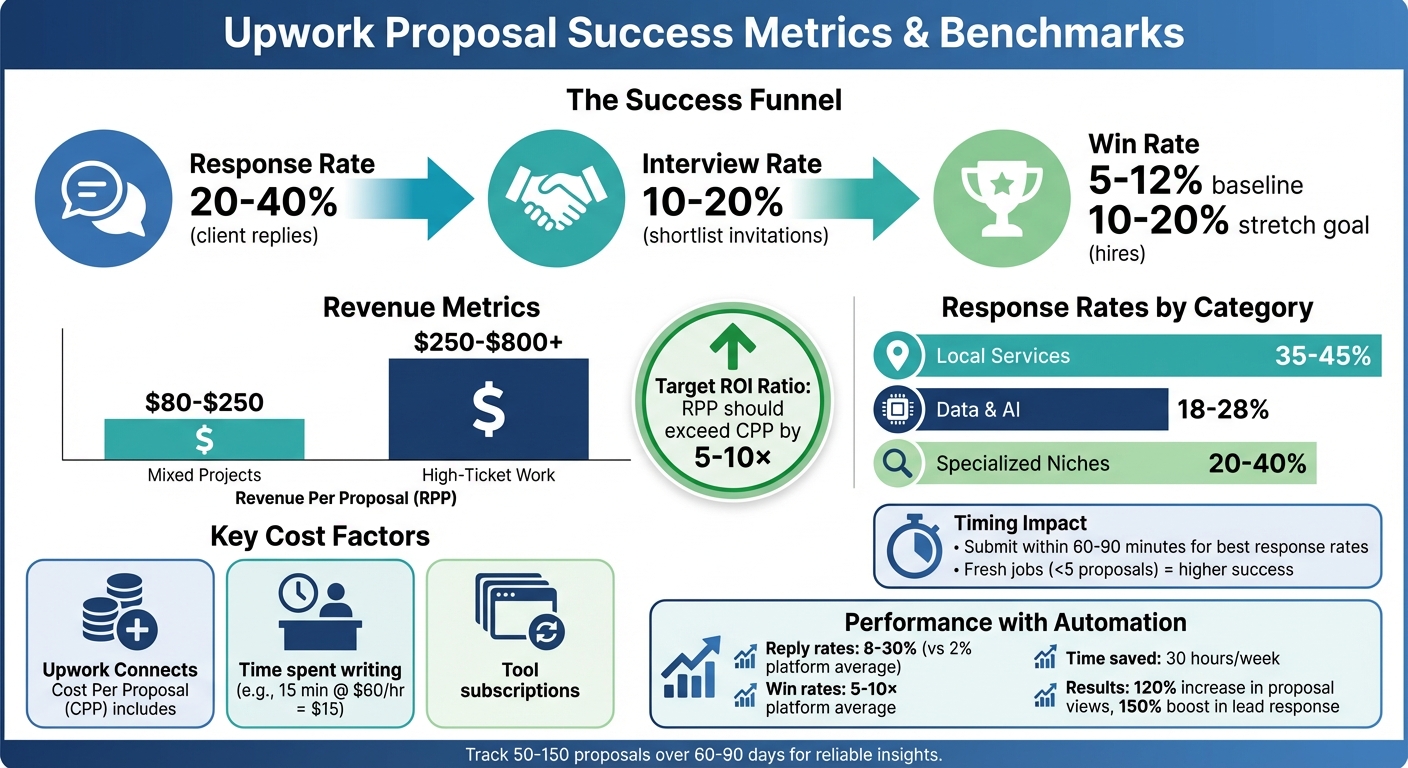
Upwork Proposal Success Metrics: Benchmarks and Target Rates for Freelancers
Get MORE UPWORK Jobs using this automation (step by step) w/ ActivePieces
sbb-itb-5c5517e
Core Metrics to Track
Understanding these metrics is crucial for improving your success rates on Upwork. The six key metrics below help you measure and refine your proposals, giving you a clear view of their performance and where your budget is going.
Response Rate and Interview Rate
Response Rate measures how many clients reply to your proposals. To calculate it, divide the number of client responses by the total proposals sent. For example, if you send 50 proposals and receive 15 replies, your response rate is 30%. This metric shows whether your opening lines grab attention and if you’re submitting proposals quickly – response rates tend to drop significantly after the first 60–90 minutes.
Interview Rate tracks how often clients shortlist you for an interview. This is calculated by dividing the number of interviews by the total proposals sent. Aim for a 10–20% interview rate. While a strong opening might get replies, this metric reveals whether you can write a winning proposal that is clear and convincing enough to move you to the next stage. If your interview rate is low, it may point to vague plans or insufficient proof of your expertise.
These metrics can vary depending on the category of work. For example, Local Services often have response rates of 35–45%, while Data & AI projects typically range between 18–28%. Tracking these rates by niche is essential because combining data from all categories can obscure both successes and problem areas. Once you’ve analyzed response and interview rates, it’s time to dig into win and revenue metrics to evaluate overall conversion success.
Win Rate and Revenue Per Proposal
Win Rate is the ultimate measure of conversion success – it’s the number of hires divided by the total proposals sent. Agencies should aim for a baseline win rate of 5–12%, with stretch goals in the 10–20% range. This metric reflects how well your pricing, trust-building, and project fit align with client expectations. If your interview rate is strong but your win rate lags, you might be losing out due to issues like pricing mismatches or unclear project scopes.
Revenue Per Proposal (RPP) is often a more telling metric than win rate. It’s calculated by dividing total revenue by the number of proposals sent, showing the average dollar value each bid generates – whether it wins or loses. For mixed projects, agencies should target an RPP of $80–$250, while high-ticket niches can reach $250–$800+. For instance, a modest win rate on $5,000 projects can be far more profitable than a high win rate on $100 tasks. Once you’ve clarified your conversion metrics, it’s time to evaluate bidding costs to determine your overall return on investment.
Cost Per Proposal and ROI
Cost Per Proposal (CPP) ensures your bidding process is cost-efficient. Calculate it by dividing total bidding expenses by the number of proposals sent. Include costs like Upwork Connects, your internal hourly rate for drafting proposals, and any relevant tool subscriptions. For example, if you spend 15 minutes on a proposal and your internal rate is $60/hour, that’s a $15 time cost per proposal.
ROI is your key profitability metric. It’s calculated as (revenue minus costs) divided by costs. Over time, your RPP should ideally exceed your CPP by a factor of 5–10×. For example, if your CPP is $20 and your RPP is $150, you’re in a strong position. Track ROI over 60–90 day periods (using data from at least 50–150 proposals) to account for short-term fluctuations. Don’t forget to consider repeat business – clients you win through proposals often return for additional milestones, significantly boosting ROI without adding new acquisition costs.
Setting Up Your Tracking System
To monitor your proposal performance effectively, aim to log around 20 data fields per proposal. If you’re handling fewer than 50 proposals a month, a simple spreadsheet will do the job. However, for higher volumes or team-based operations, tools like Convertix.io can automate the process and provide real-time dashboards for better visibility.
Basic Job Information
Start by recording key administrative details to categorize your bids accurately. Include the submission date, Job ID or URL, and the Saved Search or Lane that led you to the job. This helps pinpoint which niches or strategies are yielding the best results. Additionally, note the Client’s Country and Time Zone, the Budget Type (hourly or fixed-price), and the Listed Budget or Rate.
Timing and competition are critical, so track the Minutes from Post to Submission and the Proposal Count at Submission (e.g., fewer than 5, 5–10, or more than 10). Proposals submitted over 60–90 minutes after a job posting or when competition exceeds 10 bids often see a sharp drop in response rates.
Proposal Details
Capture metrics that reflect the quality of your proposals. Track elements like the Word Count, whether you included client-specific details (Yes/No), attached a case study or artifact (Yes/No), and described a first milestone (Yes/No).
To assess your proposals further, consider assigning a Proposal Quality Score (PQS) on a scale of 1–5. Evaluate based on these five criteria:
- Hook: Did you reference specific details from the brief?
- Plan: Did you outline a clear, testable first milestone?
- Proof: Did you provide relevant results or links?
- Fit: Are your skills and budget aligned with the job requirements?
- CTA: Did you include a clear call-to-action?
This self-assessment provides actionable insights and highlights areas for improvement over time.
Results and Costs
Finally, track outcomes and costs to understand your profitability. Record whether you received a Response, Interview, Offer, or Hire, and note the Revenue Generated if the project was secured. On the expense side, log the Connects Used, Connects Cost (in USD), Time Spent Writing (in minutes), and any Tooling Cost Allocation.
These details allow you to calculate your Cost Per Proposal (CPP) and compare it to your Revenue Per Proposal (RPP). Aim for an RPP-to-CPP ratio between 5 and 10 to ensure a healthy return. Entering this data promptly is crucial for maintaining accurate and actionable insights.
Daily, Weekly, and Monthly Tracking Activities
Daily Data Entry
Start your day by logging each proposal with essential details like Job ID, submission time, Connects used, and the estimated writing duration. Vadym Ovcharenko, Founder of GigRadar, stresses the importance of this habit:
Data hygiene: Fill columns as you go; incomplete rows destroy insight.
In short, don’t leave fields blank or delay your entries.
Make it a priority to check your Upwork inbox at least once daily. Update the status of your proposals by noting client responses, interview requests, or hires. If you’re working in a team, a quick 10-minute daily standup can help address high-priority opportunities and resolve any blockers. At the end of the day, spend 15–30 minutes on quality assurance. Verify the accuracy of your data and update your snippet library with what performed well – or didn’t. For instance, successful agencies aim to submit at least 60% of their high-priority proposals within 60 minutes of a job posting. Consolidating this daily data will set the stage for meaningful weekly reviews.
Weekly Performance Review
Once your daily updates are in place, use them to assess your weekly performance. Focus on calculating key metrics like response rate, interview rate, win rate, Revenue Per Proposal (RPP), and ROI. Remember, it’s best to analyze data from the previous week rather than the current one. As Tamara, an Upwork Consultant at Levit.tips, explains:
The analysis should be done at the end of the week, but for the PREVIOUS week, not the current one. Why? Because leads often take a few days to reply.
Segment these metrics by job category and budget tier instead of relying on overall averages. For specialized niches, a strong response rate typically lands between 20% and 40%, while interview rates often range from 10% to 25%. If your numbers fall below these benchmarks, use your review to identify potential issues – whether it’s your hook, bidding strategy, or target client profile. These insights will guide the next steps in refining your proposals.
Testing and Category Analysis
With your segmented weekly metrics in hand, start testing specific elements of your proposals. Conduct focused A/B tests, tweaking just one element at a time – such as your opening line, milestone description, or call-to-action. Test each variation across 20–30 proposals to determine if it boosts response rates by 20%. Additionally, manually review job postings to uncover patterns that could improve your proposals. For example, if clients consistently pick lower-priced freelancers, you may be targeting the wrong client profile. On the other hand, if they’re choosing higher-priced competitors, your profile might need stronger credibility signals. These insights can help you fine-tune your approach for better results.
Using AI Tools to Improve Performance
AI tools are transforming how agencies manage their bid strategies, taking the insights from detailed performance tracking and automating critical tasks for greater efficiency.
Automated Job Matching and Proposal Writing
Platforms like Convertix.io use client data – such as project history, industry specifics, and past hiring trends – to identify job postings with the best chances of success. These tools scan dozens of listings, highlight the most relevant opportunities, and let your team focus on building client relationships. By adopting a portfolio-centric approach, the system selects the most suitable case studies from your agency’s work and tailors them to each job, explaining why they’re a perfect fit. What used to take 1–2 hours per proposal can now be done in just 10 minutes.
Agencies leveraging automation have reported 3 to 7 times higher proposal output and 4 to 8 times more views on their bids compared to manual methods. While the average reply rates on Upwork hover around 2%, AI-driven personalization and matching have boosted reply rates to 8%–30%. A major factor? AI identifies "fresh" job postings – those with fewer than five proposals or posted within the last 30–60 minutes – a timing sweet spot that significantly improves response rates. And since Convertix.io operates 24/7, it captures opportunities even outside standard working hours.
Live Performance Tracking and Filters
Real-time tracking tools help agencies make smarter, faster decisions about which niches to target. Advanced filters allow you to focus on specific budget ranges – like jobs under $300, between $1,000–$5,000, or above $5,000 – and job types, ensuring your efforts are directed where they’ll have the most impact. By analyzing performance data by service type (e.g., "Shopify CRO" versus "React Dashboard"), agencies can pinpoint which niches deliver the best ROI and adjust their resource allocation accordingly.
Metrics like Revenue Per Proposal (RPP) and Cost Per Proposal (CPP) are aggregated into a central dashboard, giving agency owners the insights they need to decide which services to scale or cut. For example, a study of 15 digital marketing agencies, completed in March 2025, showed how tracking metrics like Response Rate and Win Rate led to a 120% increase in Proposal View Rate and a 150% boost in Lead Response Rate, resulting in $8 million in total contract value. These real-time insights pave the way for scalable growth through subscription-based solutions.
Scaling with Subscription Plans
Convertix.io’s subscription plans are designed to support agencies at every stage of growth.
- The Starter Plan costs $299/month and includes 300 proposals, advanced portfolio matching, and priority support for smaller teams.
- The Advanced Plan, priced at $599/month, doubles the proposal capacity to 600 and offers custom portfolio optimization with 24/7 dedicated support.
- For larger agencies, the Bespoke Plan provides unlimited proposals, personalized features, and a dedicated account manager, with pricing tailored to specific needs.
Each plan includes a 14-day free trial, allowing users to explore the platform before committing.
By automating routine tasks like screening and drafting, agencies can save up to 30 hours per week. Top-performing agencies adopting these tools report win rates that are 5 to 10 times higher than the platform average. As Kyrylo Kozak, Author at Getmany, puts it:
The future belongs to the Upwork bidder who balances technology with empathy, creativity, and professionalism.
Summary
Tracking your bid success rates can turn Upwork from a guessing game into a well-oiled sales funnel. Without proper data, agencies risk wasting Connects and losing out on valuable contracts. Key metrics like Response Rate, Win Rate, Revenue Per Proposal (RPP), and Cost Per Proposal (CPP) help pinpoint where your funnel is failing and which services deserve more attention.
Using a structured checklist is essential for consistency. Track details like job specifics, proposal quality, submission timing, and outcomes daily. Then, review your performance weekly to identify trends – such as whether proposals in certain niches perform better or if submitting within the first 30 minutes improves response rates. By analyzing this data monthly, you can turn it into actionable insights for better capacity planning and revenue forecasting.
Automation tools like Convertix.io make the process even easier. These tools screen jobs, draft proposals tailored to your portfolio, and generate bids quickly. Real-time dashboards keep your metrics updated automatically, so you can focus on closing deals. Agencies that combine structured tracking with automation have seen impressive results: a 120% increase in Proposal View Rates, a 150% boost in Lead Response Rates, and a total of $8M in contracts secured.
FAQs
What’s the fastest way to start tracking my Upwork proposal funnel?
Tracking your Upwork proposal funnel is much easier when you focus on key metrics like proposal view rate, lead reply rate, interview rate, and proposal acceptance rate. Using tools such as Convertix.io can simplify this process by providing real-time dashboards and actionable insights. Alternatively, setting up a custom dashboard or spreadsheet allows you to monitor these metrics, analyze your performance, and pinpoint areas that need improvement effectively.
How do I know if my proposal timing is hurting my response rate?
To figure out if the timing of your proposal impacts your response rate, here are a few things to keep in mind:
- Send proposals early: Many clients tend to review submissions within the first few hours after posting. Getting yours in quickly can make a big difference.
- Pay attention to timing patterns: Submitting proposals late might mean you’re missing that crucial review window when clients are most active.
- Leverage tools for quicker responses: Automation tools can help you respond faster, keeping you ahead of the competition.
By prioritizing early submissions, you can boost your visibility and improve your chances of making it to the shortlist.
How do I set a profitable RPP-to-CPP target for my niche?
To set a profitable RPP-to-CPP (Revenue per Proposal to Cost per Proposal) target, start by analyzing your proposal metrics and comparing them with industry averages. Pay close attention to your response rates, interview rates, and win rates. The goal is simple: make sure your RPP (Revenue per Proposal) consistently surpasses your CPP (Cost per Proposal) to stay profitable.
Using tools like Convertix.io can simplify this process. These tools can automate tracking, provide insights, and fine-tune your proposals. They also help ensure that your targets align with typical client budgets and project scopes within your specific niche.
