
Launching an agency on Upwork comes with unique challenges. Unlike freelancing solo, you’re starting fresh – your personal work history doesn’t transfer to your agency profile. Here’s what you need to know to get started:
- Account Setup: Create a freelancer profile first, then register your agency. Include a strong name, tagline, and professional visuals to scale your agency on Upwork.
- Membership Plans: The free Agency Basic plan limits visibility and bidding. The paid Agency Plus plan allows full access, including team management and job proposals.
- Profile Optimization: A complete profile increases hiring chances by 4.5x. Focus on team expertise, measurable results, and a polished portfolio.
- Team Management: With Agency Plus, invite team members as exclusive (agency-only) or non-exclusive (freelance independently too).
- Winning Clients: Write tailored proposals, reference specific job details, and use tools like boosted proposals to improve visibility. You can also scale outreach using an Upwork automation tool to find leads faster.
Quick Tip: Specialize in a niche and maintain a strong Job Success Score (90%+). Agencies with portfolios are hired 9x more often.
This guide covers everything from setup to securing clients, helping you navigate Upwork effectively.
Step by step approach to setup and scale your agency using Upwork to $1M
sbb-itb-5c5517e
How to Set Up Your Upwork Agency Account
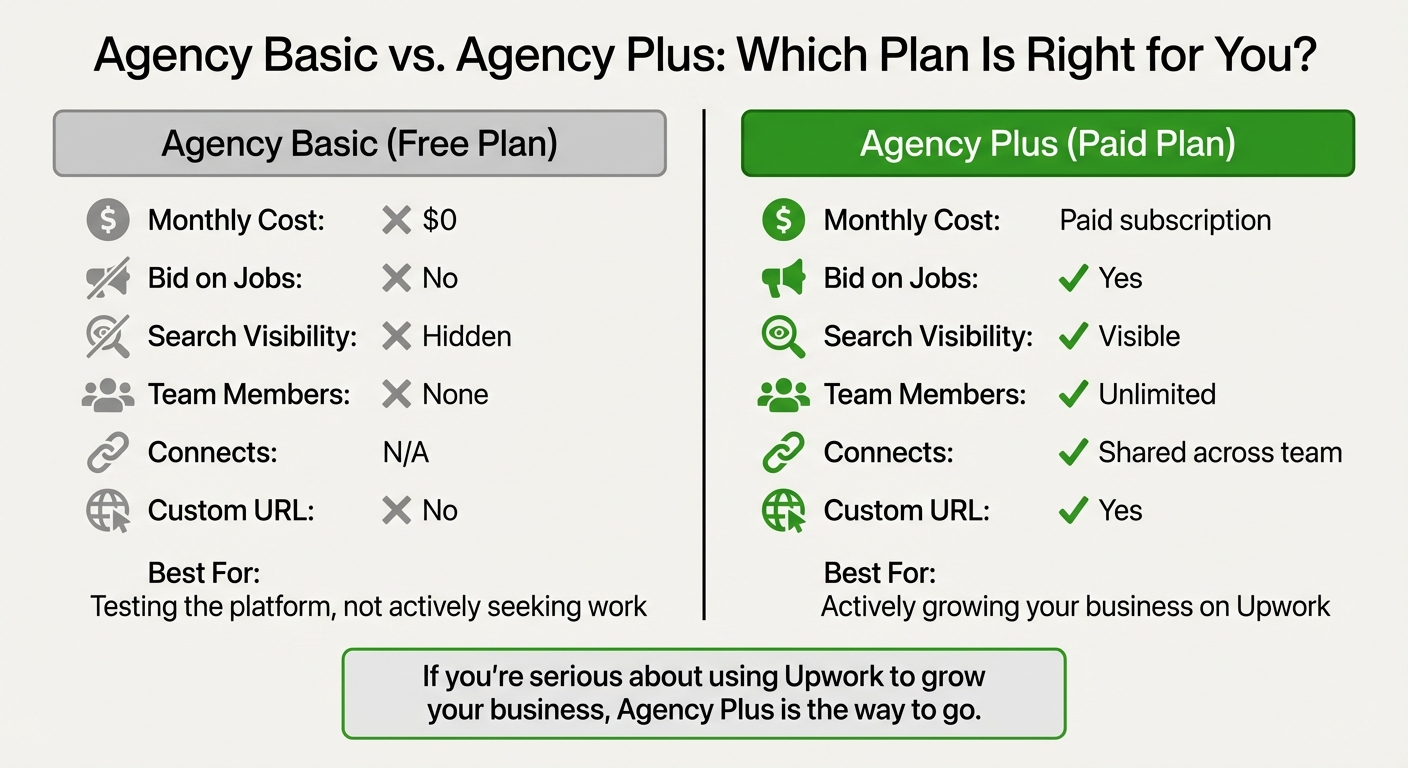
Upwork Agency Basic vs Agency Plus Plan Comparison
Agency Registration Steps
Before you can start an agency on Upwork, you’ll need to have a personal freelancer profile. Once your freelancer account is set up and active, head to Account Settings (or Settings on mobile), click the Contact Info tab, scroll down to Additional Accounts, and select New Agency Account.
To complete the setup, you’ll need to provide a few key details: an agency name, a tagline, and a service-oriented description. Don’t forget to upload a logo and banner image to make your profile stand out. You’ll also need to pick one main service category, up to 10 subcategories, and list up to 15 relevant skills. These steps will help improve your agency’s visibility. Keep in mind, though, that each freelancer profile can only be linked to one agency account.
Once you’ve submitted your agency information, Upwork typically takes 1–3 days to review it. Sometimes, they may request additional documentation, like identity verification or tax details. A strong personal profile with a high Job Success Score can also enhance your agency’s credibility, so it’s worth focusing on that before launching your agency.
After your agency account is approved, you’ll need to choose between the Basic and Plus membership plans to get started.
Agency Basic vs. Agency Plus: Which to Choose
Upwork provides two membership options for agencies: Agency Basic (free) and Agency Plus (paid). Each comes with its own set of features, so your choice will depend on how actively you plan to use the platform.
- Agency Basic is free and allows you to create a profile and browse job listings. However, you won’t be able to bid on jobs, appear in search results, or add team members. This option is best if you’re not actively seeking work yet or just testing the waters.
- Agency Plus is a paid subscription that unlocks all the features you’ll need to compete on Upwork. With this plan, you can submit proposals, accept contracts, and add unlimited team members. You’ll also benefit from shared Connects across your team, full visibility in search results, a custom URL for your agency profile, and the ability to keep your earnings private. If you’re serious about using Upwork to grow your business, the small monthly fee for Agency Plus is a worthwhile investment.
Here’s a quick comparison of the two plans:
| Feature | Agency Basic | Agency Plus |
|---|---|---|
| Monthly Cost | $0 | Paid subscription |
| Bid on Jobs | No | Yes |
| Search Visibility | Hidden | Visible |
| Team Members | None | Unlimited |
| Connects | N/A | Shared across team |
| Custom URL | No | Yes |
Choosing the right plan depends on your goals, but if you’re ready to fully engage with clients and projects, Agency Plus is the way to go.
How to Build a Professional Agency Profile
This section explains how to create a professional agency profile that effectively addresses common Upwork questions for new agencies.
What to Include in Your Agency Profile
Your agency profile needs to immediately establish trust and highlight your expertise. Since nine out of ten clients notice the profile title before exploring other sections, getting this right is absolutely crucial.
Start by selecting an agency name that reflects your brand identity. This could highlight the founder’s reputation, describe the kind of work you do, or emphasize your mission.
Your tagline should be concise and memorable – think of it as a one-line elevator pitch. A great formula to follow is: "[Specialty] for [Target Audience]." For example, “SaaS Landing Page Copywriter” clearly communicates both what you do and who you serve.
The profile overview is where many new agencies falter. Unlike freelancer profiles, which focus on individual achievements, your agency overview should highlight team expertise, the scale of projects your team can handle, and shared results. Keep in mind that Upwork shortens your overview to about 250–300 characters in search results. This means your first two sentences must grab attention by emphasizing outcomes rather than generic introductions. Start with your services, include measurable results, identify your ideal client, and close with a call to action.
Make sure your logo and banner look professional, as this can significantly impact client engagement. Agencies with polished visuals see a 35–40% increase in client inquiries. Use the banner space creatively – showcase your brand’s personality or highlight standout projects.
For your portfolio, aim to include 5–8 carefully chosen examples that demonstrate challenges, solutions, and measurable impacts. If your agency is just starting out, you can feature past projects from your core team members. Just ensure you reframe these projects to focus on business outcomes and collaboration. This is especially important because agencies with portfolios are hired nine times more often than those without.
"Focus on a very specific set of core service offerings at first. Do incredible work for your clients and establish a very strong reputation on Upwork." – Peter Korbel, Founder, 135 Madison
Once your profile content is polished, selecting the right categories will further enhance your visibility.
How to Select the Right Categories
After crafting a strong profile, choosing the right categories becomes the next critical step. Upwork’s algorithm uses these categories as key indicators to match agencies with relevant job postings and client searches, so it’s essential to be strategic.
You’re allowed to select up to 10 categories and 15 skills for your profile. Specificity is key here. For instance, choosing a subcategory like "E-Commerce Development" instead of the broader "Web Development" increases your chances of appearing in high-intent client searches. Clients looking for specialized help are typically more willing to pay premium rates.
Order matters when listing skills. Your top five skills should represent your core strengths – essentially, your biggest revenue drivers. The next ten can include secondary skills, and the remaining slots can feature broader keywords to help with discovery. Think of this as a tiered approach to skill prioritization.
To ensure alignment with client needs, review Upwork’s subcategories and use recurring keywords from relevant job postings. If a specific skill isn’t listed, consider using synonyms or broader terms to make your profile searchable. For example, instead of a niche term, you might use "Technical Documentation".
Make sure to fill all 15 skill slots to maximize your profile’s chances of appearing in search results. However, avoid listing irrelevant skills just to gain visibility. The algorithm may deprioritize profiles that seem inconsistent or irrelevant. Consistency across your profile title, overview, and skills list is key – any mismatched details can hurt your ranking.
Finally, experiment with your category and skill selections. Monitor job invites over 2–4 weeks to see what works best for your agency. Keep refining based on actual results, as what works for one agency may not work for another.
How to Add and Manage Team Members
Managing your team effectively is a crucial part of growing your Upwork agency. To start building your agency team on Upwork, you’ll need an Agency Plus subscription. Without this subscription, inviting team members to join your agency won’t be an option. Once you’ve upgraded, follow these steps to set up and manage your team efficiently.
How to Invite Team Members and Assign Roles
Once you’re subscribed, head to Settings > Teams & Members, then click on "Invite Members." Enter the email address or Upwork username of the person you want to invite. If they don’t already have an Upwork account, they’ll be prompted to create a freelancer profile before joining your agency.
While sending the invite, assign a role to each team member – Admin, Manager, or Freelancer. These roles determine the level of access they’ll have within your agency. If you need to change permissions later, go to the Teams & Members list, click the three-dot menu next to the member’s name, select "View user details", and then choose "Edit member roles".
Keep in mind, you can’t remove a team member if they’re listed as the contact on an active contract. The system will block the removal until the contract is updated.
Exclusive vs. Non-Exclusive Team Members Explained
Once roles are assigned, you’ll need to decide how each team member will engage with your agency: as an exclusive or non-exclusive member.
Exclusive members work solely on agency projects. Their profiles and proposals are fully branded with your agency’s identity, and all payments for their work are routed to the agency, which then compensates them. They rely on your agency’s Connects for proposals and can’t purchase their own Connects. You’ll also set their hourly rates and control their profile visibility – whether it’s public, visible only to Upwork users, or hidden. Additionally, exclusive members benefit from your agency’s badges (like "Top Rated" or "Plus"), which can make winning jobs easier.
Non-exclusive members, on the other hand, have more flexibility. They can work on both agency projects (using your agency’s Connects) and independent projects (using their own Connects). Payments for personal projects go directly to them. They can choose whether to submit proposals as part of your agency or as individual freelancers.
"Have both options (keep a couple of non-exclusive freelancers to apply to Independent only jobs:)" – Tamara, Levit.tips
For team members who are integral to your agency’s brand and operations, the exclusive setup is ideal. On the flip side, non-exclusive arrangements are great for specialized contractors or when you want the flexibility to bid on jobs that are only open to independent freelancers.
Freelancer vs. Agency Accounts: What’s the Difference
Deciding whether to work solo as a freelancer or establish an agency involves understanding the structural differences between the two. Here’s a closer look at what sets these options apart.
What Agency Accounts Offer
An agency account brings together multiple freelancers under a single brand, while a freelancer account is designed for individuals working independently. One key distinction is how payments are handled. For agencies, clients pay the agency directly, which then distributes compensation to its team members. However, Upwork does not oversee or provide protection for these internal payments.
Agencies also have access to tools and features tailored for team management. For example, an agency profile can showcase up to 10 services and highlight up to 15 key skills, making it easier to attract clients with complex needs. Additionally, agencies can assign specialized administrative roles: Business Managers handle proposals, Financial Managers manage billing, and Admins oversee team settings.
"Working as part of an agency gives team members the opportunity to learn from each other, grow professionally, get valuable feedback, and enhance their reputations because of what you’re able to accomplish together." – Maxim Kalin, Golden Team Soft
Another advantage is branding. All proposals submitted by agency members carry the agency’s logo and identity, presenting a unified professional image. Instead of interacting solely with an individual freelancer, clients work with the agency owner, project manager, or specific team members. This setup signals to clients that the agency is equipped to manage larger, multi-disciplinary projects with built-in quality assurance.
Freelancer vs. Agency Account Comparison
Here’s a side-by-side look at the main differences between freelancer and agency accounts:
| Feature | Freelancer Account | Agency Account |
|---|---|---|
| Best Use Case | Solo tasks requiring one expert | Complex projects requiring multiple skill sets |
| Payments | Paid directly to the individual | Paid to agency; agency compensates members |
| Connects | Individual must purchase/manage | Shared agency pool for exclusive members |
| Visibility | Individual search results | Agency search results (Agency Plus only) |
| Team Management | None | Roles for Owner, Admin, Financial, and Business Managers |
| Proposals | Branded as an individual | Branded with agency logo and name |
| Monthly Cost | $0 (Basic) | $0 (Basic) or subscription fee (Plus) |
| Service Fee | 0% to 15% per contract | 0% to 15% per contract |
These distinctions are essential for freelancers considering the shift to an agency model. For instance, Agency Basic is free but limits visibility – new jobs cannot be bid on, and the agency won’t appear in search results. On the other hand, Agency Plus requires a subscription but unlocks all platform features.
"At that point, I knew that I needed to start building a team that was going to help me support these clients because I was literally declining invitations to jobs that I was getting every day because I didn’t have the capacity to service them." – Keenan Theron, Co-Founder of Workiflow Agency
How to Win Your First Clients on Upwork
Securing those first clients on Upwork requires more than just showcasing your skills – it’s about presenting your team’s capacity, reliability, and a clear process. Clients aren’t just hiring for expertise; they’re looking for someone they can trust to deliver results. Thankfully, Upwork offers tools and strategies to help you stand out when used effectively.
How to Write Proposals That Get Responses
Successful proposals follow a structure that’s easy for clients to scan. The opening is crucial: reference something specific from the job post to grab attention. Avoid generic introductions that fail to resonate with clients. On Upwork, clients often see your answers to screening questions before your cover letter, so treat these as your primary pitch. A weak response here might stop them from even reading the rest of your proposal.
"Effective proposals are concise and specific. One detail from the client’s job post is worth more than three paragraphs about your background." – Zenlance
Keep your proposals between 150–250 words, and ensure the first 300 characters address the client’s challenge directly. Use their terminology for clarity – if they mention technical terms, mirror their language.
In the middle section, outline your solution and process. Be specific about what success looks like using "Done = [Criteria]" (e.g., "Done = reducing page load time to under 2.3 seconds"). Share a brief story of a similar project, focusing on measurable results. Wrap up with a low-pressure question instead of a generic closing like "I look forward to hearing from you." For instance, ask: "Would a keyword gap analysis be a useful first step?"
Timing is another factor. Submitting your proposal within the first 60 minutes of a job posting increases your chances of being noticed before the client is overwhelmed with submissions. Using Boosted Proposals can also help. These increase your likelihood of being hired by 24% and make your proposal 17% more likely to be read. Boosting costs extra Connects (each Connect is $0.15) to place your proposal in the top four slots.
| Element | Weak Proposal | Winning Proposal |
|---|---|---|
| Opening | "I am interested in your project…" | "I see you need a WordPress developer to redesign your psychology practice site…" |
| Focus | Focuses on "I" and general experience | Focuses on "You" and specific project goals |
| Proof | Lists skills or generic links | Shares a mini-story with measurable results from a past project |
| Next Steps | "Let me know what you think." | "Want me to share a short Loom walkthrough of a similar fix I built?" |
"Clients don’t just hire skills – they hire people they like and trust. Your proposal is your first impression, and if it doesn’t grab attention in the first few lines, you’ve already lost." – GuideUpwork
How to Build a Portfolio That Attracts Clients
Agencies with a published portfolio are hired 9 times more often than those without one. Highlight your past work, even if it’s from other platforms or notable campaigns, to establish credibility.
If you lack relevant samples, create mock projects for fictional clients. This showcases your abilities without doing free work. Use the SCARA framework (Situation, Complication, Action, Result, Artifact) to present each portfolio item as a story. Instead of generic titles like "Website Redesign", use outcome-driven titles such as "LCP 4.1s → 2.3s" to emphasize results.
"I did a few personal projects that I put together in a portfolio, just making projects for fake companies, mocking up different designs so that clients would be able to see the range of work that I could do." – Suzanne Ctvrtlik, Top Rated Plus Graphic Designer
For work covered by NDAs, you can blur logos, change brand colors, or use pseudo-data to demonstrate your competence without breaking confidentiality. Including 60–90 second Loom videos in your portfolio can further build trust by walking clients through your process. Aim for 10–15 portfolio items across 3–5 service categories to establish credibility.
When proposing to a client, reference 2–3 portfolio items that align with their needs. Each item should clearly explain the client’s problem, your solution, and the measurable result (e.g., "34% increase in checkout completion").
Using Upwork’s Tools to Your Advantage
Beyond a strong portfolio, Upwork offers built-in tools to help you gain visibility and attract clients.
The platform’s AI assistant, Uma, can draft cover letters, summarize job descriptions, and provide personalized tips based on your profile and the client’s needs. Another feature, AI-Powered Proposal Insights, shows how your proposal stacks up against competitors before you hit submit.
Activate the Availability Badge to signal that you’re ready for immediate work – this can increase job invitations by up to 70%. Setting up job alerts ensures you’re among the first to respond to new postings, which often receive more attention. Use the My Stats page to track how many of your proposals are being viewed and how your profile ranks against others. If your proposals aren’t getting noticed, tweak your profile keywords and skills, as Upwork’s algorithm prioritizes these over descriptive text.
For scaling your outreach, tools like Convertix.io automate job matching and proposal generation. This allows agencies to scale their operations without the overhead of additional staff. Starting at $299/month, it creates tailored proposals based on your portfolio, maintaining relevance and high conversion rates.
"You’re not trying to get a job. You are trying to solve a problem." – Corinna Zennig, Top Rated Plus Data Analyst
Lastly, build social proof by requesting testimonials from LinkedIn or other external sources before you accumulate Upwork reviews. Adding a short video introduction to your profile can also boost views by 30%.
Conclusion
Starting and growing an agency on Upwork means treating your profile like a storefront that evolves with your business. A complete profile and a strong portfolio are the foundation of your visibility on the platform. Regular updates and well-targeted proposals are key to staying relevant and securing opportunities.
"Your Upwork profile is your resume, your cover letter, and your portfolio all wrapped into one. It deserves as much care as your best client deliverable."
- Zenlance
Specializing in a niche – like "Shopify Performance Optimization" instead of generic "web development" – not only helps you stand out but also attracts higher-paying clients and ensures you’re appearing in the most relevant searches. Keeping your Job Success Score (JSS) above 90% is another critical factor for maintaining visibility and favor within Upwork’s algorithm.
Efficiency is just as important as persistence. Crafting manual proposals can take over 25 hours each week. Best Upwork tools for small agencies like Convertix.io, which start at $299/month, can automate job matching and proposal creation, allowing your team to focus on delivering top-tier work. By streamlining these processes, you can improve both relevance and conversion rates.
Make it a habit to update your profile regularly, check your metrics monthly, and refresh your skills quarterly. These incremental improvements add up, helping your agency shift from constantly chasing clients to being sought after. With consistent updates and the smart use of automation, including the best Upwork automation tools, your agency can stay ahead in an ever-changing marketplace.
FAQs
Can I use my personal Upwork history on my agency profile?
Yes, you can showcase your personal Upwork history on your agency profile. This is a great way to highlight your experience and demonstrate the expertise your agency offers. It also helps potential clients understand the value your team brings to the table.
When should I upgrade from Agency Basic to Agency Plus?
If your agency is ready to take things to the next level, consider upgrading to Agency Plus. This membership offers extra features like advanced management tools and enhanced visibility – perfect for growing your agency. You can upgrade anytime by navigating to Settings > Memberships & Connects. Take a moment to assess your agency’s goals and see if these added perks match what you’re looking for.
How do I keep my agency’s Job Success Score above 90%?
To keep your Job Success Score (JSS) above 90%, prioritize keeping your clients happy. This means delivering high-quality work, maintaining clear communication, and sticking to deadlines.
Be selective about the jobs you take on – pre-qualify opportunities to ensure they’re a good fit for your skills. Break projects into smaller, manageable milestones with clear deliverables, and keep your clients updated regularly to build trust and avoid surprises.
When wrapping up a project, ensure a smooth handoff by providing detailed notes and promptly requesting feedback. Also, keep an eye on key metrics like your on-time delivery rate and rehire percentage. These can highlight areas for improvement and help you maintain long-term success.
